Easy Guide: How to write a knowledge base article


Each knowledge base article is a chance to support your users through the onboarding journey. Fail to do so, and well… churn is a risk.
Knowledge base articles are the go-to resource tool for any questions, trouble, or queries that allow users to continue working around a platform.
The articles that populate your Knowledge Base all play a role in creating a comprehensive solution to your user's problems.
Understanding how to create a knowledge base will help solve problems quicker for users, reduce support tickets, and create a more enjoyable user journey.
By following a few simple steps, you can create articles that are clear, concise, and engaging.
What is a knowledge base article?
A knowledge base article lives in your knowledge base or help center.
It's usually a self-help article that provides answers to common customer questions.
It is typically organized into topics and contains step-by-step instructions on how to use the product or service. Knowledge base articles help customers solve problems quickly and independently, enabling them to get the most out of their product or services.
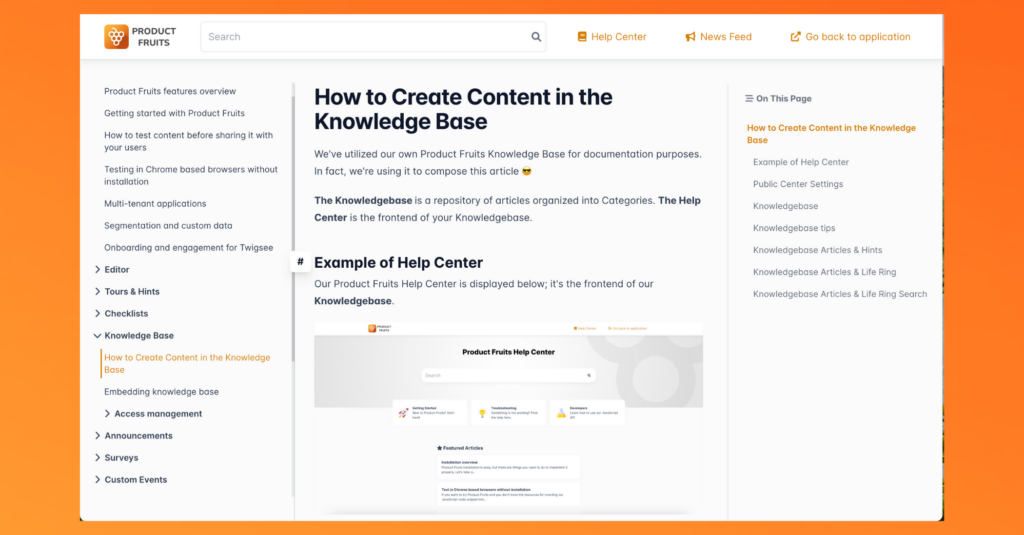
Here's an example of an article on Product Fruits Knowledge base:
Read A guide to creating your Knowledge Base (Steps, tips, and examples)
Steps to write a Knowledge base Article
We recommend writing a few articles before publishing your knowledge base. That way, once it's published it will be populated with helpful content.
Here are some helpful steps to write your first knowledge base article.
Step 1: Identify the problem
Research your user's common questions and support requests. This will help you understand what features and processes require the most amount of support material.
It's helpful to organize questions by category. That way you can create content by feature or problem pillars and create a comprehensive resource page.
It's good practice to put yourself in the user's shoes to understand their struggles. This will help you build empathy and understanding.
Step 2: Write the article
Once you’ve identified the problem, you can start to write the article. Each article should guide users through the steps to troubleshoot their problems.
Lists and guides are helpful content structures for each article, as they show users exactly what to do.
Here are some helpful tips when writing your article:
- Use clear and simple language, avoid jargon
- Include media to help users visualize steps. For example, screenshots, videos, images, or GIFS.
- Use a clear structure with H1, H2s, and H3s to help guide users through content
- Interlink any helpful resources, direct tool links, or support contact
Remember, the goal is to help he user solve their problem as fast as possible. Make instructions short and snappy so users can quickly find thir solution.
Step 3: Double-check the content
Checking content is twofold: The actual process written is correct, and there is no grammar or spelling errors
Before publishing the article, it is important to test it. Have a few people who are familiar with the product review the article and provide feedback.
Fresh eyes can spot any grammar errors and share if there needs to be any improvement.
Step 4: Publish the Article
Publish your article to your knowledge base. Make sure to include the article in the relevant categories and tags, so that it’s easy for customers to find.
Fruity Tip: Add links to your article to your life ring button. That way users can quickly find the relevant articles for the feature or page they currently navigate.
👀 Pssst... Looking for some Knowledge base inspiration? 5 Knowledge Base SaaS Examples and Why They Work.
Write, publish, and include article to your platform with Product Fruits
Product Fruits is an onboarding tool platform that improves your user conversion, and retention. How? It has all the tools to show users the value of your product -- fast.
It's an invisible layer on top of your platform that allows you to click and add onboarding tools, knowledge base articles, and surveys without any code.
Product Fruit's knowledge base is customizable, you can create your unique article to fit your brand and choose privacy options. That means you have complete control on who can see certain content.
The knowledge base can be interlinked to your hints, tooltips, and life ring buttons for users to easily troubleshoot their issues and find support instantly.
Interested in learning more? Book a demo with our specialists to go through what the solution looks like for your business. Or, try it out for yourself for 14 days for free.


Weekly newsletter
Get the latest releases, tips, articles, and exclusive interviews delivered to your inbox weekly—no spam!