How to Drive SaaS Platform Adoption Using AI Tools: Proven Strategies


Driving SaaS platform adoption using AI tools involves three core strategies: implementing AI-generated personalized onboarding, deploying conversational AI for instant support, and using behavioral AI to adapt guidance in real-time. Companies using Product Fruits' Elvin AI achieve 64% activation rates by automatically personalizing experiences for each user based on role, industry, and behavior patterns. Traditional onboarding averages 25% activation, making AI tools the most effective approach for modern SaaS adoption.
Platform adoption determines SaaS success. Products with strong adoption retain customers, expand revenue, and grow through referrals. Products with weak adoption churn users and waste acquisition spend.

What Makes AI Tools Different for SaaS Adoption?
Traditional adoption strategies rely on manual work. Product teams build onboarding flows for each user segment. Support teams answer the same questions repeatedly. Customer success managers guide users individually through features.
This manual approach doesn't scale. Adding new user segments requires building new onboarding. Launching features means creating new tutorials. Growing user base means hiring more support staff.
AI tools change the economics. Once implemented, they handle personalization automatically, answer questions instantly, and adapt to user behavior without additional human work. The same AI system that guides 100 users works equally well for 10,000 users.
AI tools provide:
- Automatic personalization based on user attributes
- Instant answers to questions without support tickets
- Behavioral adaptation that improves over time
- Scalable guidance that doesn't require proportional resources
- Continuous optimization through machine learning
The shift from manual to AI-powered adoption represents the biggest change in SaaS onboarding since interactive product tours replaced static documentation.
Strategy 1: Implement AI-Generated Personalized Onboarding
Generic onboarding treats all users identically. Everyone sees the same product tour regardless of their role, experience level, or goals. This one-size-fits-all approach fails because users have fundamentally different needs.
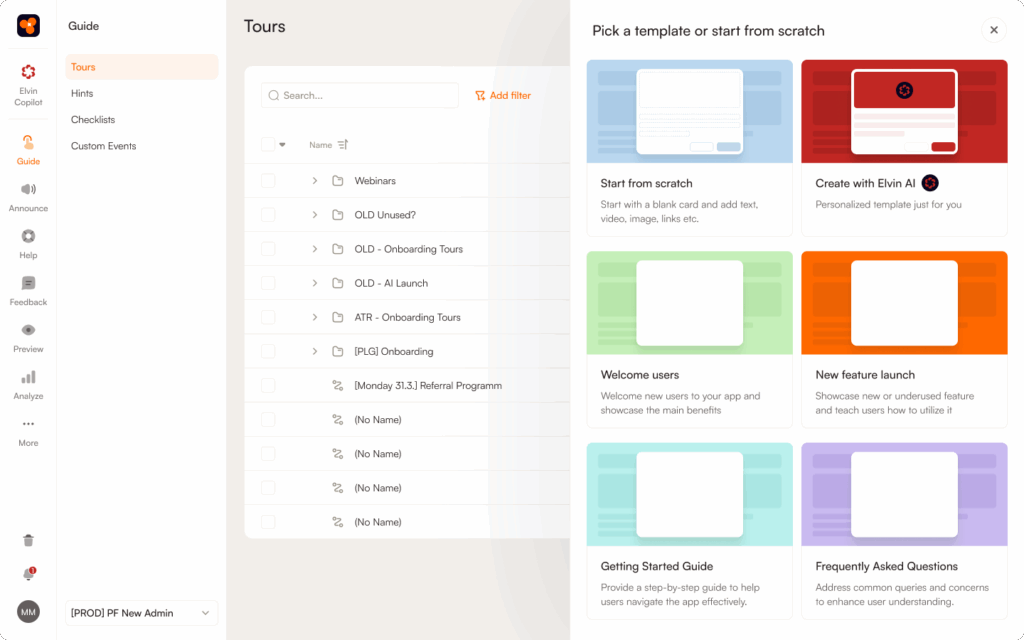
AI-generated onboarding solves this by creating personalized experiences automatically. Product Fruits' Elvin AI exemplifies this approach. Teams annotate their product interface once. The AI then generates appropriate onboarding for each user based on attributes collected during signup.
Implementation steps:
A) Define User Segments
Start by identifying meaningful user groups. These segments should have genuinely different adoption paths, not superficial differences.
Effective segmentation criteria:
- Role or job function (marketing manager vs developer)
- Industry vertical (healthcare vs retail vs finance)
- Company size (startup vs enterprise)
- Experience level (beginner vs power user)
- Use case or goal (collaboration vs automation vs reporting)
Collect these attributes during signup. The data you gather determines how well AI can personalize onboarding. Product Fruits uses this information to automatically generate appropriate guidance for each segment.
B) Map Critical Adoption Actions
Different user segments need to complete different actions to reach value. Marketing managers need to create campaigns. Developers need to integrate APIs. Sales reps need to log activities.
Identify the 2-3 critical actions that constitute "activation" for each segment. AI tools will guide users toward these specific outcomes rather than generic product tours.
Example for project management SaaS:
- Team leads: Create workspace, invite team, set permissions
- Project managers: Create project, add tasks, set deadlines
- Team members: Complete assigned task, add comments, update status
C) Connect Adoption platform to User Data
Personalization requires access to user attributes and behavioral data. This typically happens through:
Integration with analytics platforms like Segment or Mixpanel provides behavioral data showing what users actually do in the product.
CRM connections to HubSpot or Salesforce add firmographic data about company size, industry, and account value.
Direct attribute passing from your application to the adoption platform shares role, goals, and other signup information.
Product Fruits integrates with major platforms automatically. See how it works for technical implementation details.
D) Let AI help you Generate Flows
Once user segments and critical actions are defined, AI will help you and generate appropriate onboarding flows. Product Fruits' Elvin AI creates different tours based on your input without manual building (you can adjust them, of course). It can also generate dynamic tours on the fly at the point and time when users struggle ad ask Elvin Copilot for help.
E) Monitor and Refine
Track onboarding flows. Some might need different approaches. The AI can help you build adjusted content, but teams should review performance regularly.
Key metrics to track:
- Activation rate by user segment
- Time to first value by segment
- Onboarding completion rates
- Drop-off points in flows
- Feature adoption patterns
Product Fruits includes analytics showing exactly how users progress through onboarding flows, you may need third-party analytics tools for some further user and product-related analysis.
Strategy 2: Deploy Conversational AI for Instant Support
Users get stuck constantly. They can't find features. They don't understand terminology. They forget how to complete actions. Traditional support creates friction through ticket submission, search interfaces, and delayed responses.
Conversational AI eliminates this friction by providing instant answers to natural language questions. Users ask questions in their own words. The AI provides immediate, relevant answers from existing documentation.

Implementation approach:
A) Organize Knowledge Base Content
Conversational AI is only as good as the information it accesses. Before deploying AI support, organize documentation properly.
Best practices:
- Write in clear, simple language users understand
- Structure content with logical categories
- Include step-by-step instructions for common tasks
- Add screenshots showing exactly what to click
- Keep information current as product changes
- Remove outdated or contradictory content
Product Fruits' Elvin Copilot searches this organized content to answer user questions. The better organized your documentation, the more accurate the AI answers become.
B) Deploy AI Copilot in Product Interface
Place conversational AI directly where users work. Separate help centers require leaving the product, losing context, and interrupting workflow.
In-product AI copilots let users ask questions without context switching. They stay focused on their tasks while getting immediate help. Product Fruits embeds Elvin Copilot directly in the product interface as an always-available assistant.
C) Train AI on Common Questions
Initial deployment handles obvious questions well. The AI can hepl you improve your sources (knowledge base) by analysing user questions over time. This allows you to:
- Identify patterns in common queries
- Ensure documentation addresses these topics
- Review AI answers for accuracy
- Route complex questions to human support
Adeus now provides 24/7 support using this approach. The AI handles common questions instantly. Human support focuses on complex issues requiring judgment.
D) Set Up Escalation Rules
Some questions require human expertise. AI should recognize its limitations and escalate appropriately rather than providing uncertain answers. The escalation becomes a support ticket or chat with context preserved. Human agents see what the user asked and what the AI attempted, providing continuity.
E) Measure Support Impact
Track how conversational AI affects support operations and user experience.
Impact metrics:
- Support ticket volume before and after
- Question resolution rate by AI
- User satisfaction with AI answers
- Time to answer questions
- Support cost per user
Chemsoft reduced support tickets by 30% using Elvin Copilot. Nodes & Links cut support tickets by 25% with the same approach. The AI deflects common questions while maintaining user satisfaction.
Strategy 3: Combine AI with Human Touchpoints
AI tools handle scalable, repeatable adoption work. Humans handle strategic, high-touch engagement. The combination produces better results than either approach alone.
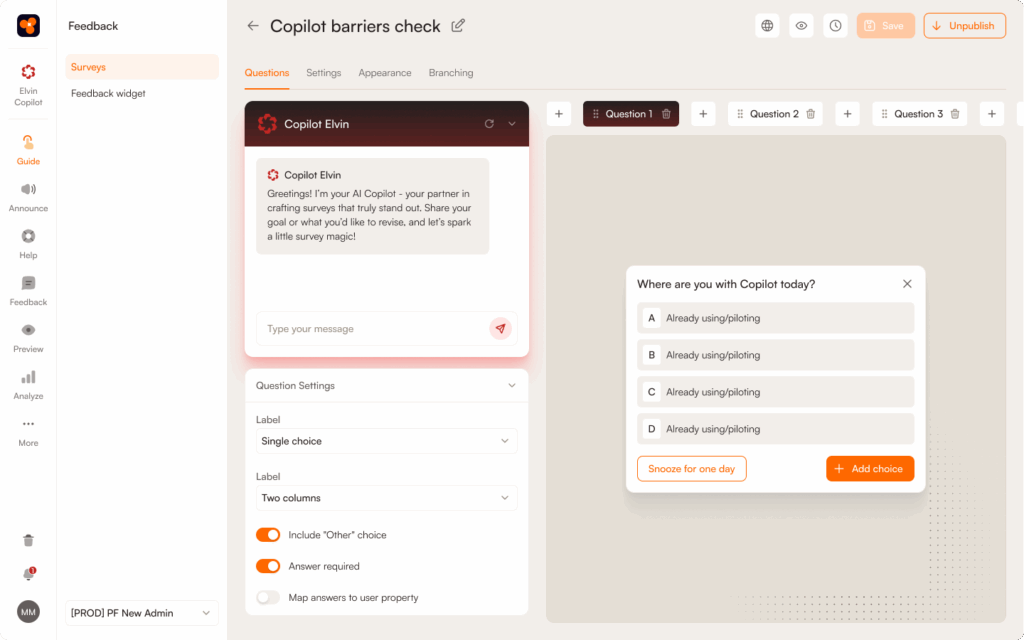
Strategic combination approach:
A) Let AI Handle Volume
Whenb set up properly and provided with quality support and product information (knowledge base, annotations) AI should be able to handle majority of support conversations as described above. This frees up capacity of human workfors for other, higher-value tasks.
B) Focus Humans on High-Value Accounts
Customer support and success teams engage personally with strategic accounts, enterprise customers, and high-potential users.
Human-appropriate activities:
- Strategic adoption planning
- Custom implementation guidance
- Executive stakeholder management
- Complex technical troubleshooting
- Expansion opportunity identification
C) Use AI Insights to Inform Human Outreach
AI adoption tools generate valuable data about user behavior, questions and struggle points. This data helps customer success teams prioritize and personalize outreach.
AI-generated insights for human teams:
- Users stuck on specific features
- Common adoption blockers by segment
- Feature requests from usage patterns
- And many more, depedning on your product and implementation...
Customer success teams use these insights to reach out proactively with relevant guidance before users churn.
D) Create Smooth Handoffs
When users need human help, the transition from AI to human should be seamless. Context should carry over completely.
Effective handoff includes:
- Summary of AI interactions
- Questions user has asked
- Documentation AI provided
Product Fruits passes this context automatically when escalating to human support, preventing users from repeating themselves.
What are some Common AI Adoption Strategy Mistakes?
Implementing AI without clear adoption goals. AI tools are means to ends, not ends themselves. Define what successful adoption looks like before implementing any AI.
Expecting AI to fix fundamental product problems. AI makes good products easier to adopt. It can't make bad products good. If the product itself doesn't deliver value, AI won't help.
Over-automating human interactions. Some situations need human empathy and judgment. Don't route everything through AI. Reserve human interaction for high-value, complex situations.
Neglecting data quality. AI personalization requires accurate user data. Garbage in, garbage out. Clean up user attributes and behavioral tracking before implementing AI.
Setting and forgetting. AI adoption tools require ongoing monitoring and refinement. Review performance monthly and adjust strategies based on results.
How do you get Started with AI Adoption Tools?
Start with the highest-impact adoption challenge. Don't try to implement all strategies simultaneously. Pick one area where AI can deliver clear value quickly.
Recommended starting points:
If initial activation is weak: Begin with AI-generated onboarding content. This typically delivers fastest results.
If support costs are high: Start with conversational AI for instant question answering. Support deflection provides immediate ROI.
If feature adoption lags: Use AI to design product tours, enable features like Product Fruits Elvin AI dynamic tours that provide on-demand guidance individually.
Measure baseline metrics before implementation. Clear before-and-after data demonstrates AI impact convincingly.
Most teams see meaningful results within 30-60 days of implementing AI adoption strategies. The technology works fast when applied correctly.
Explore different AI agent solution options and review use cases across industries.
Ready to drive SaaS adoption using AI tools? Use Product Fruits and let Elvin AI implement these proven strategies automatically. Compare with other adoption tools or explore no-code approaches.


Weekly newsletter
Get the latest releases, tips, articles, and exclusive interviews delivered to your inbox weekly—no spam!