How to Build Personalized User Onboarding Without Writing Code


Most onboarding experiences have a dirty secret: they treat every user the same. The SDR and the VP of Sales get the same welcome card. The power user and the first-timer click through the same three-step tour. The enterprise client on a business plan gets the same introduction as the startup on a trial. And then everyone wonders why activation rates are stuck.
The data isn't kind about this. McKinsey's research found that 71% of consumers expect companies to deliver personalized interactions - and 76% get frustrated when they don't. That expectation doesn't switch off when someone opens a SaaS product. And according to aggregated SaaS benchmarks, the average activation rate across the industry still hovers around 37.5%. The gap between "signed up" and "got real value" remains the single most expensive problem in product-led growth - and generic onboarding is one of its biggest causes.
The good news: building onboarding that genuinely adapts to each user no longer requires a developer, a complex CRM workflow, or weeks of setup. Tools like Product Fruits Flows visual canvas for building adoption that covers not just user profiles, but even individual onboarding and product user journeys change the game completely.
We have recently covered Product Fruits Flows in a live launch webinar with Martin Fišera and Daniel Musialek. Watch Martin showcase flows or read below the best practice tips and recommendations.
Read on about best practice for building personalized user onboarding, or try it out in Product Fruits' new Flows canvas builder right now.
Why "segmentation" alone isn't enough
The traditional answer to one-size-fits-all onboarding was segmentation: group users into buckets, build a tour for each bucket, and show the right tour to the right group. It's better than nothing - but it has a ceiling.
As Martin Fišera, CPO of Product Fruits, put it during the Flows launch webinar: "Not every person comes to your platform and says, 'I'm a product manager, therefore I have the same needs as other thousands of other product managers.' Even within a bucket, each individual is different."
Segment-based tours are built around the average user in a group. Real users diverge from that average constantly - based on what they already know, what brought them there that day, what they tried first, and what confused them. Onboarding that can't respond to those divergences in real time stops being guidance and becomes noise.
What's changed is that the tools to go further - to personalize at the individual level, not just the segment level - are now accessible without writing a line of code.
1. Branch by what you already know about the user
The simplest form of personalization uses information you already have. If your users have roles, industries, plan tiers, or any other property attached to them - whether sent from your backend or pulled from a CRM - Flows can branch the experience immediately based on that data.
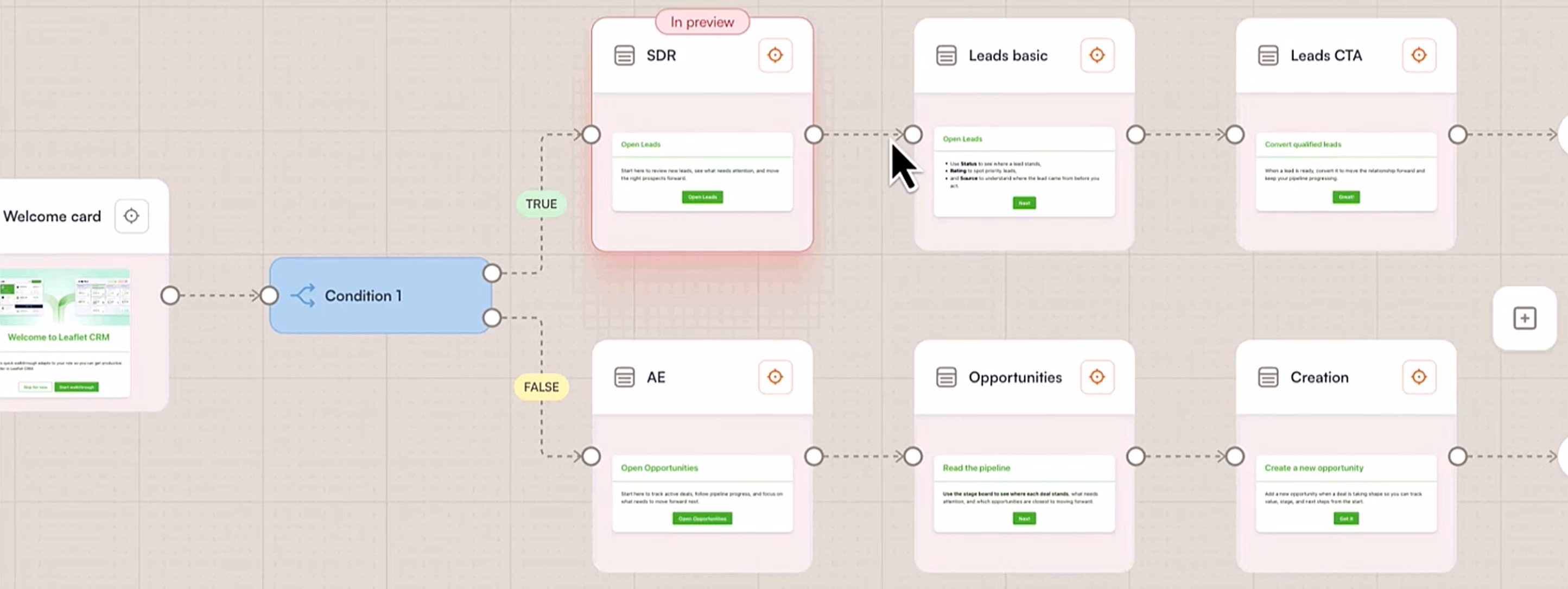
The practical setup is straightforward: one welcome card for everyone, then a condition node that reads the user property and routes each user down the appropriate path from there. An SDR gets taken to the leads workflow. An account executive gets introduced to the pipeline view. No overlap, no irrelevant guidance, no "skip this if it doesn't apply to you."
This is a significant upgrade over managing multiple separate tours for different segments - the logic lives in one place, the branching is visual, and updating one path doesn't require rebuilding the others.
2. Learn first, then adapt - using AI to classify intent
The more powerful case is when you don't already know what a user needs. This is where Discoveries and Elvin come in.
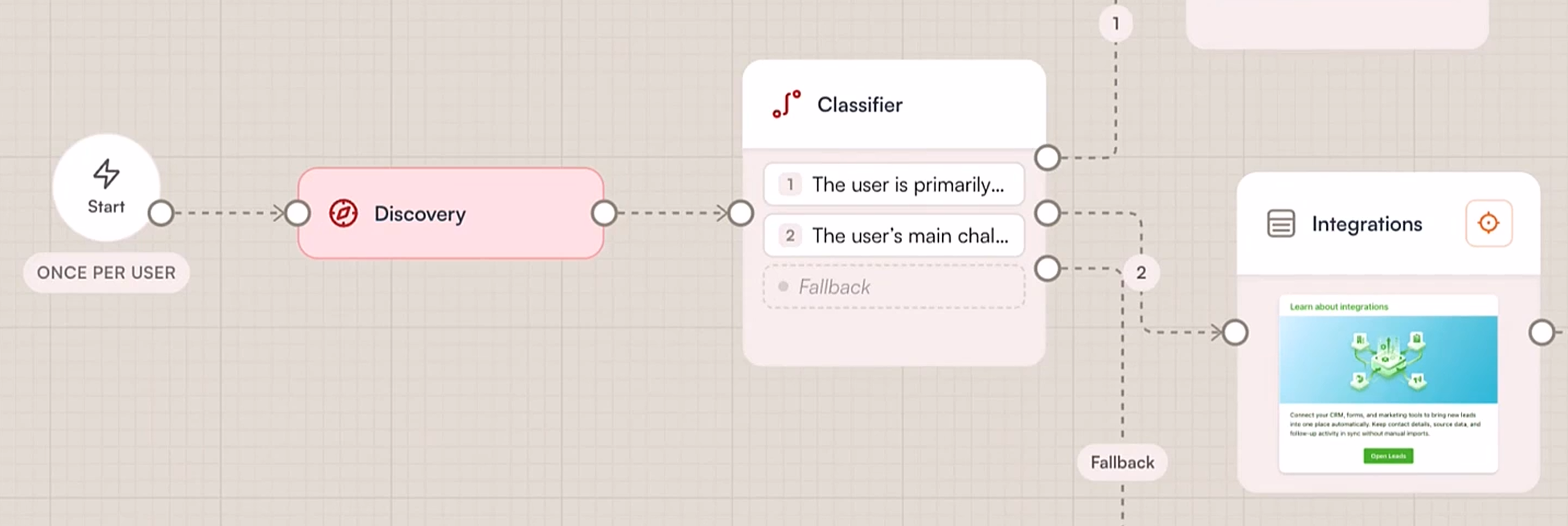
Instead of starting with a card, a Flow can open a Discovery - an AI-guided conversation (not a static survey) where Elvin asks the user a few natural questions about what brings them there, what they're hoping to achieve, or what their biggest challenge is. Discoveries cap at three to four questions by design, so the time commitment is minimal. But the signal they generate is rich.
That signal then feeds directly into an AI Classifier node, which reads the user's answers in plain language - no JSON, no tagging logic, no conditional rules to maintain - and routes each user to the right path. The instructions are written in natural language: "Users who are primarily interested in SDR workflows" and "Users who are struggling with integrations" are enough. Elvin handles the classification for each individual, separately.
The result: onboarding that genuinely reflects what a user told you they needed, processed instantly, without anyone on your team reading survey responses and manually changing anything.
Research backs the impact: personalized onboarding paths increase completion rates by 35% and Day 30 retention by up to 52% compared to generic flows. Those numbers move because personalization isn't cosmetic - it's the difference between guidance that feels relevant and guidance that feels like it was built for someone else.
3. Wait, check, and respond - onboarding that extends beyond day one
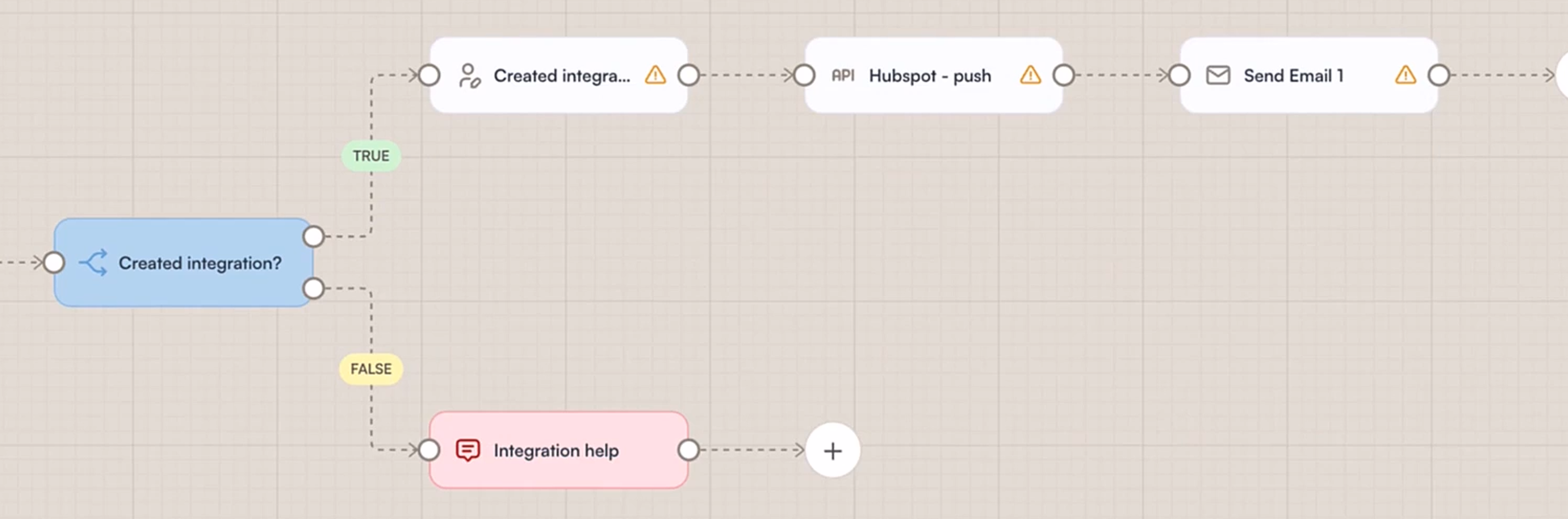
Personalization doesn't have to end after the welcome sequence. Flows can wait - literally - and then act based on what happens next. A flow can show a user how to set up an integration, pause for 48 hours, check whether they actually created one, and then take a different path depending on the answer: congratulate and move them forward, or trigger Elvin to proactively offer help.
This is onboarding as a continuous, adaptive process rather than a one-time event. It keeps the experience relevant at day two, day seven, and beyond - without manual intervention every time someone falls behind.
No code. No developer ticket. No CSS master required.
One of the persistent frustrations with in-app onboarding has been the cost of iteration. Building the first version was manageable. But every update - a new card, a revised headline, a tweaked condition - meant a developer ticket or a painful session with a CSS editor. Onboarding stopped evolving alongside the product because the tooling made evolution too expensive.
Flows is designed to remove that friction entirely. The card editor is drag-and-drop, with AI writing assistance and image generation built in. Global style templates mean brand consistency is set once and applied everywhere. Reusable card templates mean that a step you built for one flow can be dropped into another in seconds. And the visual canvas means the branching logic is legible to anyone on the team - not just the person who built it.
The practical outcome: what used to take hours takes minutes. What used to require a developer requires a product manager, a growth person, or a customer success lead.
Where to start
The most common mistake with personalized onboarding is trying to personalize everything at once. A more effective approach: identify the single biggest divergence point in your current user base - the moment where different users most clearly need different things - and build your first branching flow around that.
For most products, that's the onboarding entry point: role, use case, or team size. Start there. Run it with a smaller, targeted group first. Measure completion and activation against your baseline. Then extend.
Flows is available on all Product Fruits plans, with advanced AI and integration nodes on Pro and Business. Try it out for free now. If you already have Product Fruits set up, go to Guide → Flows in your admin to build your first flow, or book a demo to see it live with your own use case.
Wrap up: Personalization at the segment level was a meaningful step forward. Personalization at the individual level - responsive to what each user tells you, does, and needs - is where the next decade of activation wins will come from. The tools to get there are already in your admin.
FAQ section
What is personalized user onboarding?
Personalized user onboarding adapts the in-app guidance a user receives based on who they are, what they need, and how they behave - rather than showing the same sequence to every user. This can mean branching based on role or plan, using AI to classify intent from a short conversation, or adjusting the experience based on actions a user takes (or doesn't take) after their first session.
How do you personalize onboarding without a developer?
Modern no-code onboarding tools like Product Fruits Flows allow teams to build branching logic, AI-powered classification, and behavior-triggered guidance using a visual canvas - no code, no CSS, no developer tickets required. The key elements are a drag-and-drop card editor, condition and classifier nodes that can be configured in plain language, and reusable templates for consistency at scale.
What's the difference between segmented and individualized onboarding?
Segmented onboarding shows different experiences to different groups of users - for example, one tour for admins and another for end users. Individualized onboarding goes further: it responds to what each specific user tells you, does, or needs in real time, even within a segment. AI classification and conversational discovery make individualized onboarding practical to build without custom code.
Does personalized onboarding actually improve activation?
Yes - consistently. Personalized onboarding paths have been shown to increase completion rates by 35% and Day 30 retention by up to 52% compared to generic flows. The mechanism is straightforward: guidance that feels relevant to what a user is actually trying to do gets completed; guidance that feels generic gets skipped.
Sources:


Weekly newsletter
Get the latest releases, tips, articles, and exclusive interviews delivered to your inbox weekly—no spam!