50+ good survey questions that get replies and real insights


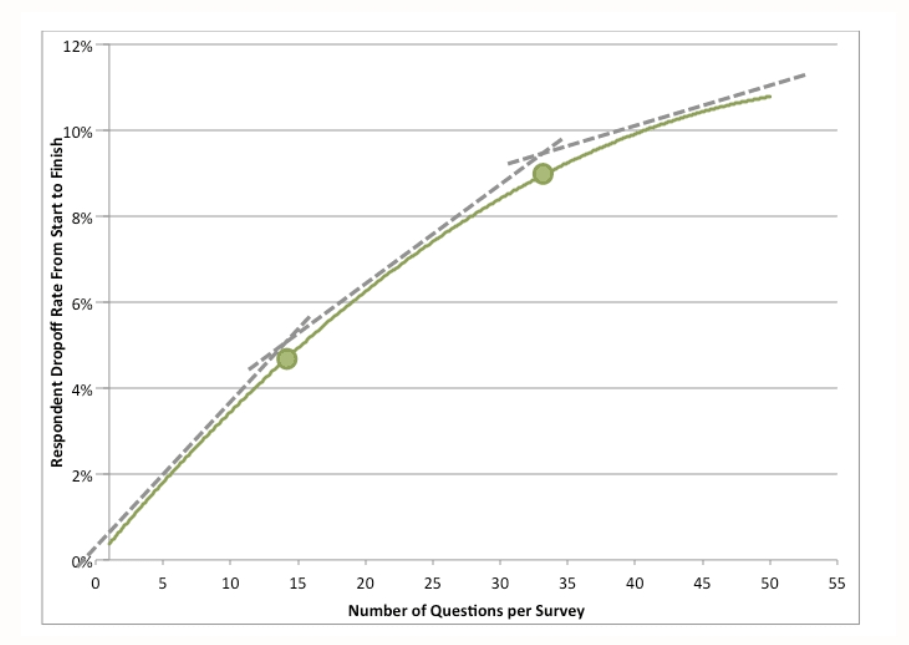
TL;DR: A good survey question is clear, neutral, asks about one thing, and ties to a decision you will actually make. Keep surveys short – completion drops from 89% at 10 questions to 79% at 40 (SurveyMonkey) – and ask inside your product, where in-app surveys average a 27.5% response rate, and up to 36% on mobile (Refiner, 2025). Below are 50+ ready-to-use questions grouped by goal: profile, product adoption, feature adoption, satisfaction and CSAT, and NPS and loyalty. Each comes with when to ask it and why it works, plus a checklist to write your own.
"Wow, that's a great question." Have you ever had that thought mid-conversation? It's the feeling you get when someone asks something thoughtful, relevant, and clearly tuned to what you just said. The right question provokes thought and makes you feel heard.
The same is true in your product. The right survey questions shape your roadmap, sharpen onboarding, and tell you why users stay or leave. The wrong ones return noise you can't act on. This guide covers what separates a good survey question from a bad one, then gives you 50+ examples grouped by goal so you can copy, adapt, and ship your next survey today.
In a hurry to send in-app surveys? Here's your quick-start free trial link. 👈
What makes a good survey question?
A good survey question is easy to understand on a single read, stays neutral, asks about one thing at a time, and maps to a decision you plan to make. If you can't name what you'll do with the answer, cut the question.
That last point matters more than any wording trick. Start from the decision, not the topic. Write down the action you'll take, then write the shortest question that gives you what you need to take it. The Nielsen Norman Group frames the core rule the same way: remove jargon, keep each question to a single specific topic, and ask only about things essential to your research goal (NN/g).
Here's the anatomy of a question worth asking:
A checklist for crafting effective survey questions
Run every question through this list before you ship - think of it as cheat sheet for your next survey.
- Is the question relevant to the goal of the survey?
- Is it clear and easy to understand on one read?
- Does it target one specific thing, without being broad or ambiguous?
- Is the phrasing neutral and unbiased?
- Have you avoided double-barreled questions (two questions in one)?
- Are closed and open-ended questions used on purpose, not by habit?
- Do closed questions offer response options that cover every answer without overlap?
- Have you tested the wording on a few real users first?
Do this, not that: Instead of "How satisfied were you with our excellent onboarding?", ask "How would you rate your onboarding experience?" The first version tells the user the answer you want. The second lets them tell you the truth. A single leading word can quietly skew a whole dataset.
How many questions should a survey have, and when should you ask?
Fewer than you think, and closer to the moment than you'd expect. Completion rates fall as surveys grow: a 10-question survey completes at 89% on average, while a 40-question survey drops to 79% (SurveyMonkey). Open-ended questions cost even more – ten of them cut completion to 78% versus 88% for a single open-ended question. Abandonment climbs sharply once a survey runs past 7 to 8 minutes.
The practical takeaway: for in-app micro-surveys, aim for one to five questions and one open-ended prompt at most. Save the long-form study for a moment users have opted into.
Timing decides quality as much as wording. Ask a profile question during signup, a feature-adoption question right after someone uses the feature, and an NPS prompt once a user has enough history to have an opinion. The context makes the answer honest, which is a big reason in-app surveys average a 27.5% response rate, rising to 36% on mobile – far above typical email survey rates (Refiner, 2025).
Profile and onboarding survey questions
Profile questions tell you who each user is – their role, goals, and expectations – so you can personalize onboarding from the first session. Ask these at signup or in the first run, and keep them short. Every answer should route the user to a more relevant path.
Product adoption survey questions
Product adoption drives loyalty, retention, and revenue. The more deeply users adopt your product, the more likely they are to stay and pay. These questions tell you what users value, how widely they use you, and what stands between them and full adoption.
Feature adoption survey questions
Every new feature is a bet. It lands, or it flops. Feature adoption questions tell you whether users found the feature, understood it, and got value from it, so you can fix discovery, education, or the feature itself. Fire these on the feature page, right after someone uses it or pointedly ignores it.
Product satisfaction and CSAT survey questions
Satisfaction sits upstream of churn and retention. When your product reliably does the job, it earns a permanent spot in the user's stack. These questions gauge how happy users are and, more usefully, why. Pair a rating with one open-ended prompt so you capture both the score and the story.
NPS and loyalty survey questions
Net Promoter Score measures how likely users are to recommend you – a proxy for loyalty and growth. The standard question is simple, but the follow-ups are where the value hides. For context, B2B SaaS NPS tends to cluster around 36 to 38, and anything above 40 puts you in the top quartile (Survicate). Ask once users have enough history to hold an opinion, then re-ask on a set cadence.
In-app beats inbox: An NPS email that lands in a crowded inbox competes with everything else in there. The same question shown in-app, right after a win, reaches the users who actually use your product – which is why in-app surveys average a 27.5% response rate, and up to 36% on mobile (Refiner, 2025). If a survey type could live either place, put it in the product.
9 tips to get more (and better) survey answers
Great questions still underperform if the survey around them is clumsy. These nine tips lift both your response rate and the quality of what comes back.
1. Match the design to your product. A survey that looks bolted on gets ignored. When it matches your UI – colors, fonts, tone – users trust it and answer more thoughtfully.
2. Start from the decision. Every question should trace back to an action you'll take. If you want to improve trial conversion, ask about the onboarding experience, not general usage habits.
3. Keep the language plain. Swap jargon for the words your users already use. Instead of "Rate your satisfaction with our onboarding artifacts", ask "Was the setup guide helpful?" Ambiguity skews data.
4. Use branching to stay relevant. Survey branching, also called survey logic, changes the next question based on the last answer. It skips irrelevant questions and digs deeper where it matters, so users see a shorter, sharper survey.
5. Stay neutral. Drop loaded words and assumptions. Instead of "Do you prefer our helpful product tours over checklists?", ask "Which do you prefer: product tours or checklists?"
6. Ask one thing at a time. Double-barreled questions force users to average two judgments into one answer. Split "How fast and accurate is search?" into two questions.
7. Choose closed vs. open on purpose. Use closed questions for numbers you'll track. Use open questions for the reasons behind them. Don't stack open-ended prompts – ten of them cut completion to 78% versus 88% for one (SurveyMonkey).
8. Cover every response option. For closed questions, make sure the choices are complete and don't overlap. Add an "Other" field when you're not sure you've captured them all.
9. Test before you ship. Run the survey past a handful of real users first. Check that the branching logic fires correctly and that every question reads the way you intended.
Turn survey answers into in-app action with Product Fruits
Collecting answers is the easy part. The hard part is closing the loop – turning a low score or a confused comment into a fix the user actually feels. Most teams stop at the response and move the fix to a different tool. That's where insight goes to die.
Product Fruits keeps the whole loop in one place. You can run NPS and in-app surveys alongside the tours, checklists, hints, and announcements you already use – one install, one segmentation engine, one dashboard. Ship a zero-to-ten NPS survey, a 1-to-5 CSAT prompt, or a multi-step feature survey, and segment by plan, role, or behavior so the right person sees it at the right moment.
Because surveys share a platform with your onboarding, the answer can trigger the next step automatically. A low CSAT can fire a hint on the screen that confused the user. A feature survey that reveals confusion can launch a tour on that exact page. A promoter score can prompt a referral. This is also where Flows earn their keep: a Flow is a branching, behavior-aware experience that can drop a survey into the middle of a journey, then route the user based on how they answer.
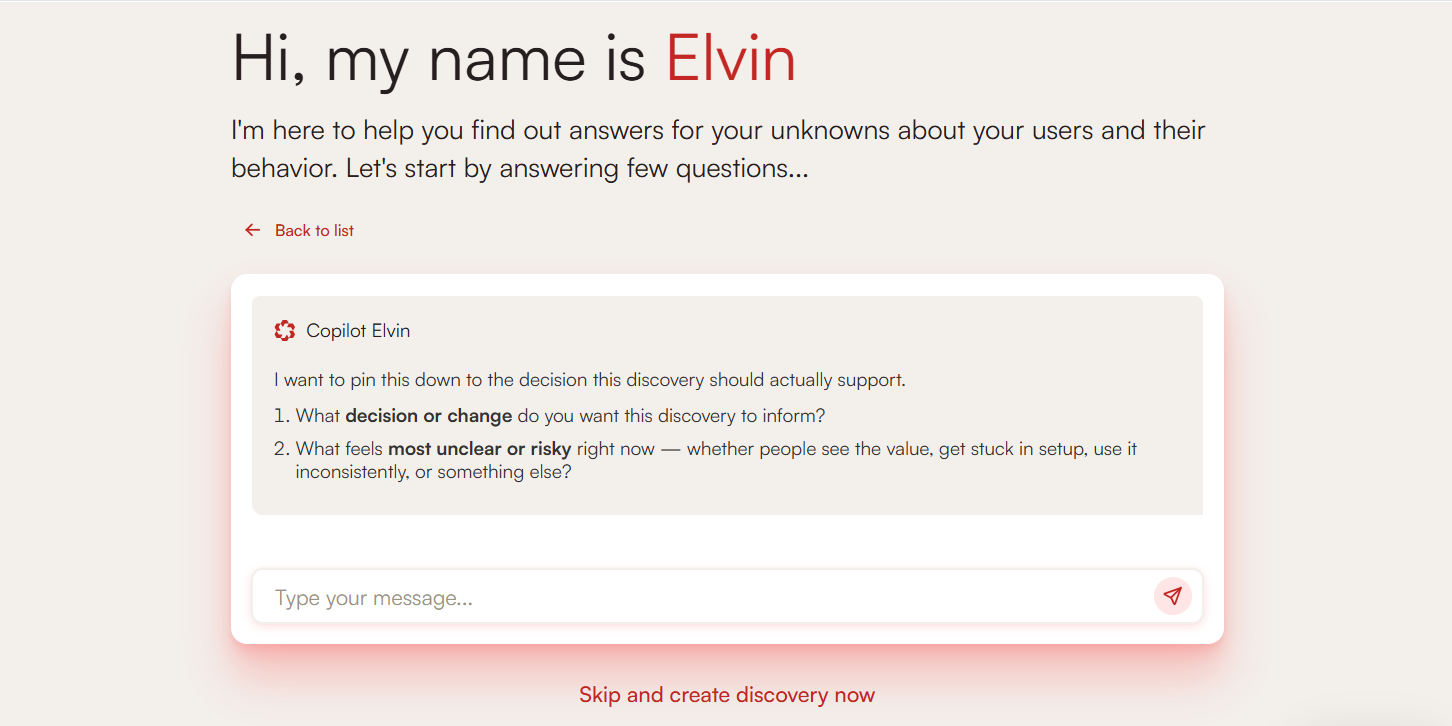
Product Fruits also has strong survey branching built in, so you can skip irrelevant questions and dig into the "why" without writing code. And Elvin, the built-in AI, reads the open-ended replies for you – tagging each by topic and sentiment and clustering them into themes so your team spends time on the fix, not the read. Prefer to work from your feedback data in your own AI assistant? The read-only Product Fruits MCP lets tools like Claude connect to your workspace over the Model Context Protocol, using a secure OAuth sign-in.
You can start from a template or build a survey from scratch. Either way, it's drag and drop – no coding required – and every survey can be styled to match your product exactly. Last, but not least, Product Fruits offers a new and different way to run surveys are Discoveries - conversational surveys carried out by Elvin AI.
Frequently asked questions
What makes a good survey question?
A good survey question is clear, neutral, and focused on one thing, and it maps to a decision you'll actually make. It reads correctly on the first pass, avoids leading language, and skips jargon. If you can't say what you'll change based on the answer, the question isn't earning its place in the survey.
How many questions should a survey have?
For in-app micro-surveys, one to five questions is the sweet spot, with at most one open-ended prompt. Completion rates fall as surveys grow – from 89% at 10 questions to 79% at 40, per SurveyMonkey – and abandonment rises sharply past 7 to 8 minutes. Ask less, more often.
What is a double-barreled question and why avoid it?
A double-barreled question asks about two things at once, like "How fast and accurate is our search?" Respondents can only give one answer, so they average two judgments and your data blurs. Split it into two single-focus questions – one for speed, one for accuracy – so each answer is clean and actionable.
What are examples of good product survey questions?
Strong product survey questions target a specific goal. For adoption: "What would make you use [product] more often?" For satisfaction: "What's the main reason for your score?" For loyalty: "How likely are you to recommend us to a colleague?" Each ties to a clear next step, from fixing friction to routing promoters into referrals.
Are in-app surveys better than email surveys?
For product feedback, usually yes. In-app surveys reach users while they're engaged and in context, so response rates run far higher – averaging 27.5%, and up to 36% on mobile, well above typical email rates (Refiner, 2025). Email still suits long-form research or reaching lapsed users who no longer log in.
How do I write unbiased survey questions?
Remove any word that signals a preferred answer, and cut assumptions about what the user thinks. A quick test from NN/g: read the question aloud and ask whether someone could honestly answer it more than one way. If not, it's likely leading. Keep scales balanced and offer a neutral midpoint.
How can I create in-app surveys without a developer?
Use a no-code adoption platform. With Product Fruits, you build NPS, CSAT, and multi-step surveys by drag and drop, add branching logic, segment the audience, and style everything to match your app – no engineering tickets required. Answers can trigger tours or hints automatically, closing the loop in the same tool.
The bottom line
Good survey questions aren't a wording trick – they're a discipline. Keep each one clear, neutral, single-focus, and tied to a decision, keep the survey short, and ask inside your product where users are paying attention. Do that, and your surveys stop generating noise and start shaping your roadmap, onboarding, and retention.
The last mile is acting on what you learn. Product Fruits lets you run NPS, CSAT, and feature surveys in the same platform as your onboarding, so a low score or a confused comment can trigger the very tour, hint, or fix that resolves it. Book a demo or try Product Fruits for free to see how in-app surveys turn silent users into honest feedback you can act on.


Weekly newsletter
Get the latest releases, tips, articles, and exclusive interviews delivered to your inbox weekly—no spam!