8 SaaS knowledge base examples and what makes them work


TL;DR
- A SaaS knowledge base is a self-service library of articles, guides, and FAQs that helps users answer their own questions inside or alongside your product.
- The best 2026 examples share the same fundamentals: search that works, three to six clear categories, plain language, visuals, and a visible last-updated date.
- Eight worth studying: Product Fruits, Slack, Stripe, Canva, Veed, Visme, HubSpot, and Dropbox.
- The newest shift: your knowledge base now serves two audiences at once – humans skimming for an answer, and AI assistants answering on your behalf. Structure it for both.
- Product Fruits lets you build an AI-ready knowledge base that lives inside your app, with Elvin AI surfacing answers the moment users get stuck.
Most users would rather solve a simple problem themselves than wait for a human. Nearly 8 in 10 consumers say AI bots are helpful for simple issues, according to Zendesk. When your knowledge base is good, that instinct saves everyone time. When it is bad, it just adds a frustrating detour before the support ticket lands anyway.
So the stakes are simple. A well-built help center deflects tickets, speeds up onboarding, and quietly builds trust. A cluttered one buries the answer and trains users to skip straight to email.
This guide breaks down eight SaaS knowledge base examples worth learning from, plus the criteria that separate a help center people actually use from one that just exists. Steal what works.
What is a SaaS knowledge base?
A SaaS knowledge base is an online, self-service repository of information that helps users navigate a software product and solve problems on their own. It typically holds FAQs, troubleshooting guides, step-by-step tutorials, product documentation, and short videos, organized so people can find answers without contacting support. Strictly speaking, the knowledge base is the content repository behind the scenes, while the public site users actually visit is often branded a "help center" – though in practice many companies use the two terms interchangeably.
Good ones do more than store articles. They surface the right answer at the right moment – in search, inside the product, or through an AI assistant that understands what the user meant, even when they use the wrong words.
The demand is real. Zendesk reports that 51% of consumers prefer interacting with bots over humans when they want immediate service. Yet many companies still under-invest in self-service. That gap is exactly where a strong knowledge base wins.
What makes a great knowledge base in 2026
Great help centers make different products, but they make the same choices. A prominent search bar does most of the heavy lifting. Three to six top-level categories keep the homepage scannable in one glance. Popular topics sit above the fold. Every article follows a consistent shape, links to related content, and shows when it was last updated.
The 2026 addition is AI. The best knowledge bases now feed AI search and in-app assistants, not just human readers, so clean structure and plain language matter more than ever. Gartner predicts that by 2029, agentic AI will autonomously resolve 80% of common customer service issues, cutting operational costs by 30%. Those agents can only answer as well as the knowledge base behind them.
The shift that changes how you write: Your knowledge base now has two readers – a person skimming for an answer, and an AI assistant answering on your behalf. Both reward the same things: clear headings, one idea per section, plain words, and direct answers up front. Write for the AI and you write better for the human too.
Use this as a checklist when you audit your own help center against the examples below.
8 SaaS knowledge base examples
Here are eight help centers that get the fundamentals right, and the one lesson to take from each.
1. Product Fruits – answers that come to the user
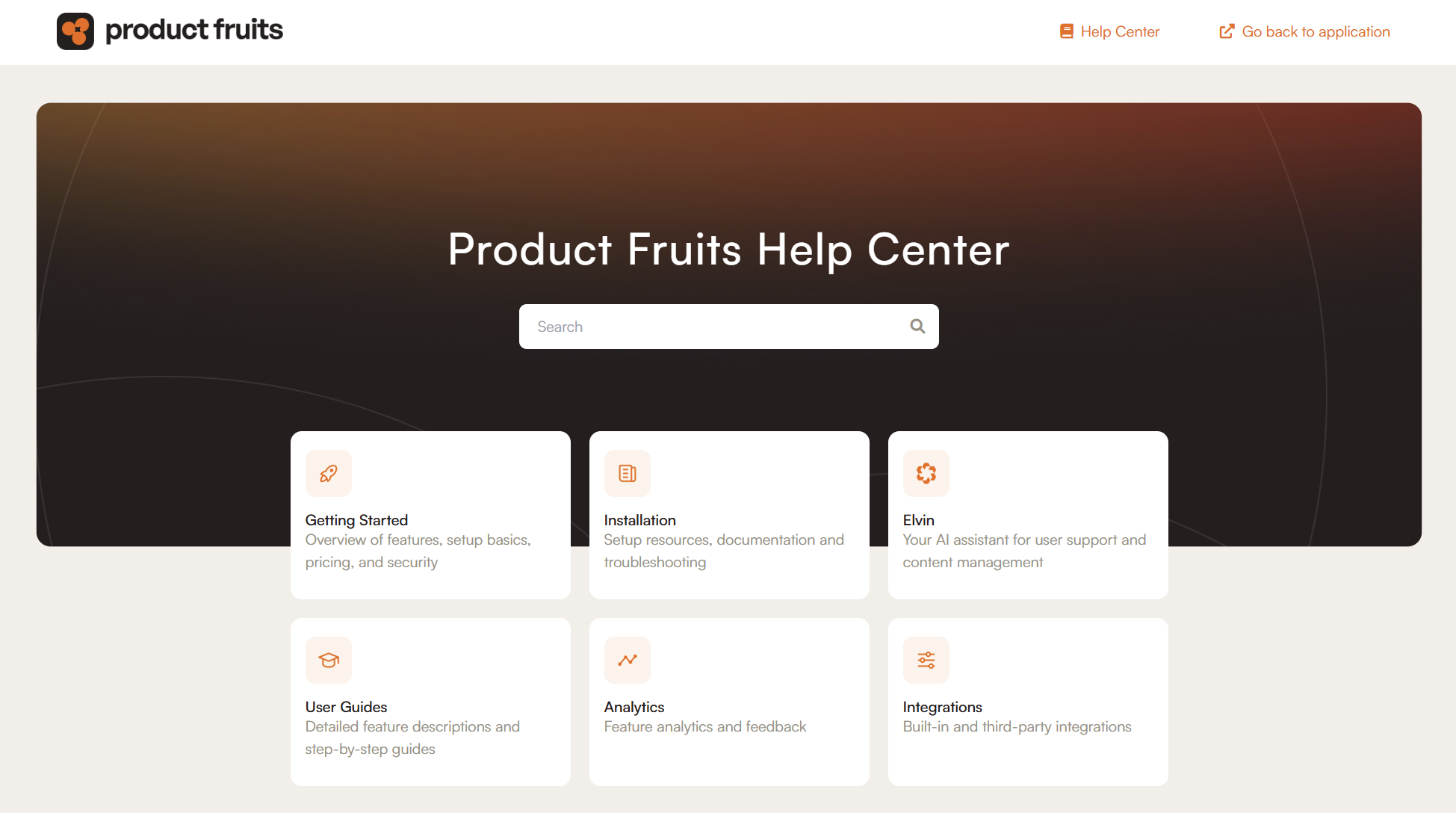
Product Fruits is a product adoption platform, and its own knowledge base is built on the same tool it sells. The help center uses a small set of clear categories, featured articles up top, and media-rich guides with images and video that simplify complex steps.
The differentiator is where the knowledge lives. Instead of making users leave the product to search a separate site, Product Fruits keeps help available in-app through the Elvin widget. Users ask a question in plain language and Elvin surfaces the right article, even when they phrase it differently than the docs - and even provides guidance or shows how to do the particular task.
Fruity tip: Place answers where the problem happens. The fewer clicks between confusion and resolution, the more your knowledge base gets used.
2. Slack – clear, concise, on-brand
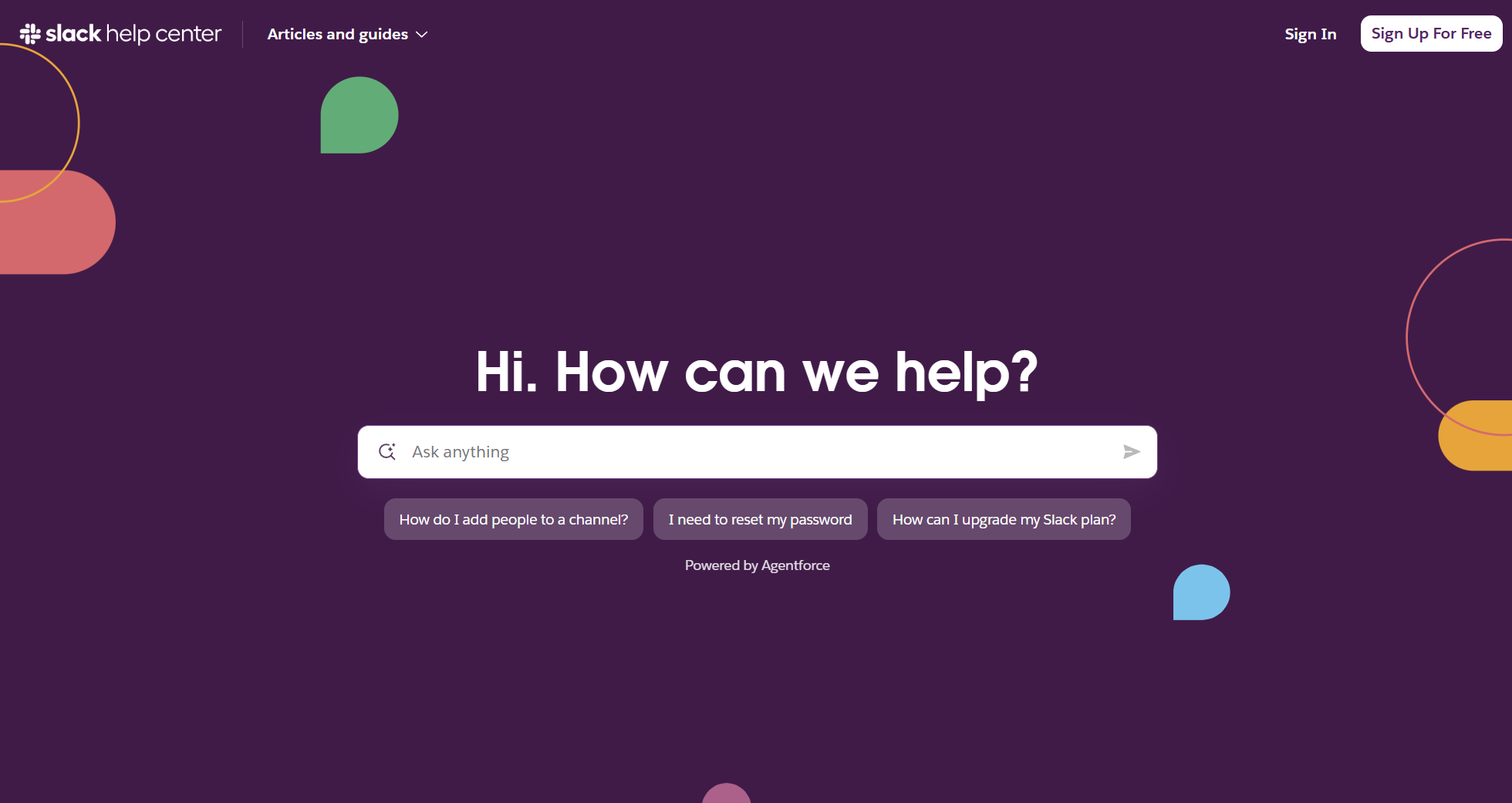
Slack's help center is a masterclass in staying simple at scale. Six top-level categories cover the whole product, a prominent search bar with suggested questions handles most journeys, and the tone stays warm and unmistakably Slack.
The knowledge base keeps its brand voice while mixing in images, videos, and interactive content that make instructions easy to follow. Most-needed answers sit first, followed by topic clusters and featured articles. Slack has also layered AI search on top, so users can ask a question and get pointed straight to the answer.
Fruity tip: Mine your support tickets for the questions people ask most, then put those answers first. When users see their exact problem solved on arrival, they come back.
3. Stripe – documentation as a product
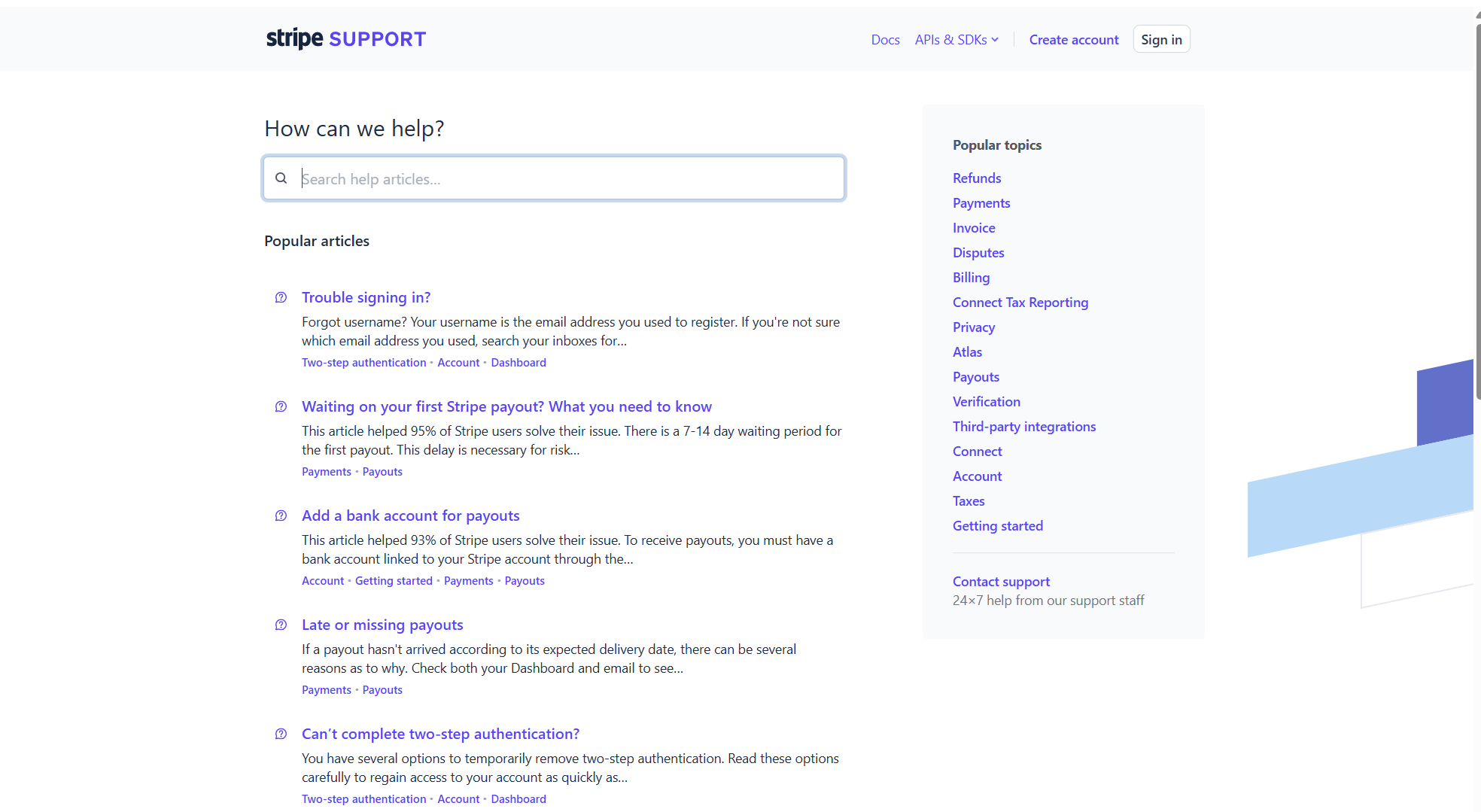
Stripe's docs are widely treated as the benchmark for developer-facing knowledge. The experience is fast, deeply searchable, and rigorously structured, with a consistent article shape and code examples that sit right next to the explanation.
What makes it work is respect for the reader's time. Navigation is predictable, every page has a clear job, and related references are one click away. Even if you do not sell to developers, Stripe shows what happens when documentation is treated as a core product rather than an afterthought.
Fruity tip: Give every article a single, obvious purpose. A page that tries to answer five questions usually answers none of them well.
4. Canva – visual-first and beginner-friendly
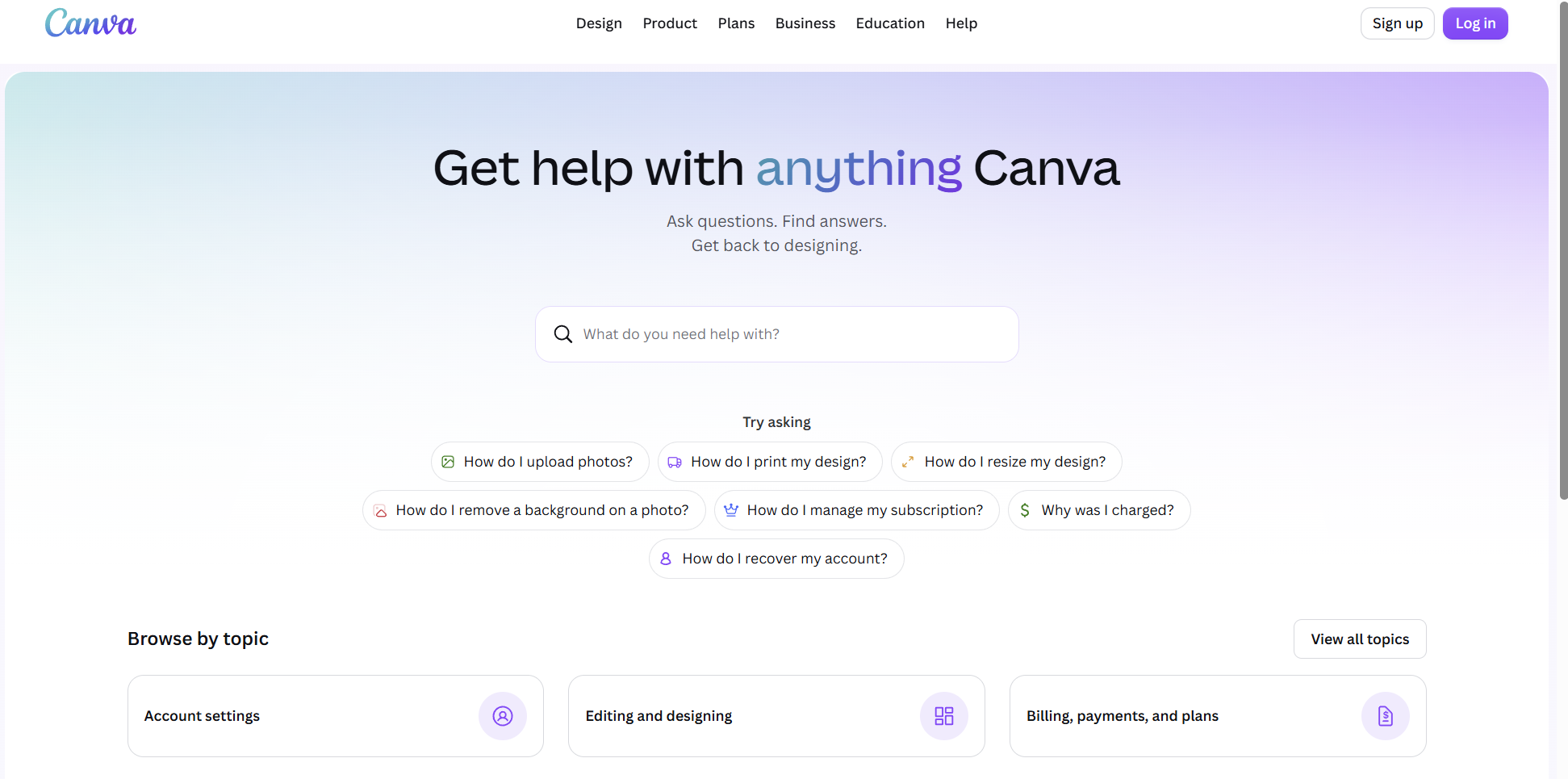
Canva's help center matches its product: bright, visual, and welcoming to non-experts. It now leads with an "ask a question" search and a row of suggested questions, so users type what they want in plain language instead of digging through menus. Below that, they can browse by topic or jump to common fixes.
The articles themselves lean on screenshots and short clips, so users see the steps rather than parse a wall of text, and Canva keeps deeper learning in a separate Design School. It is a strong model for any product whose users are not technical and learn best by watching.
Fruity tip: For a broad audience, lead with video and visuals. A 40-second clip often beats a 10-step written guide.
5. Veed – minimalist and intuitive
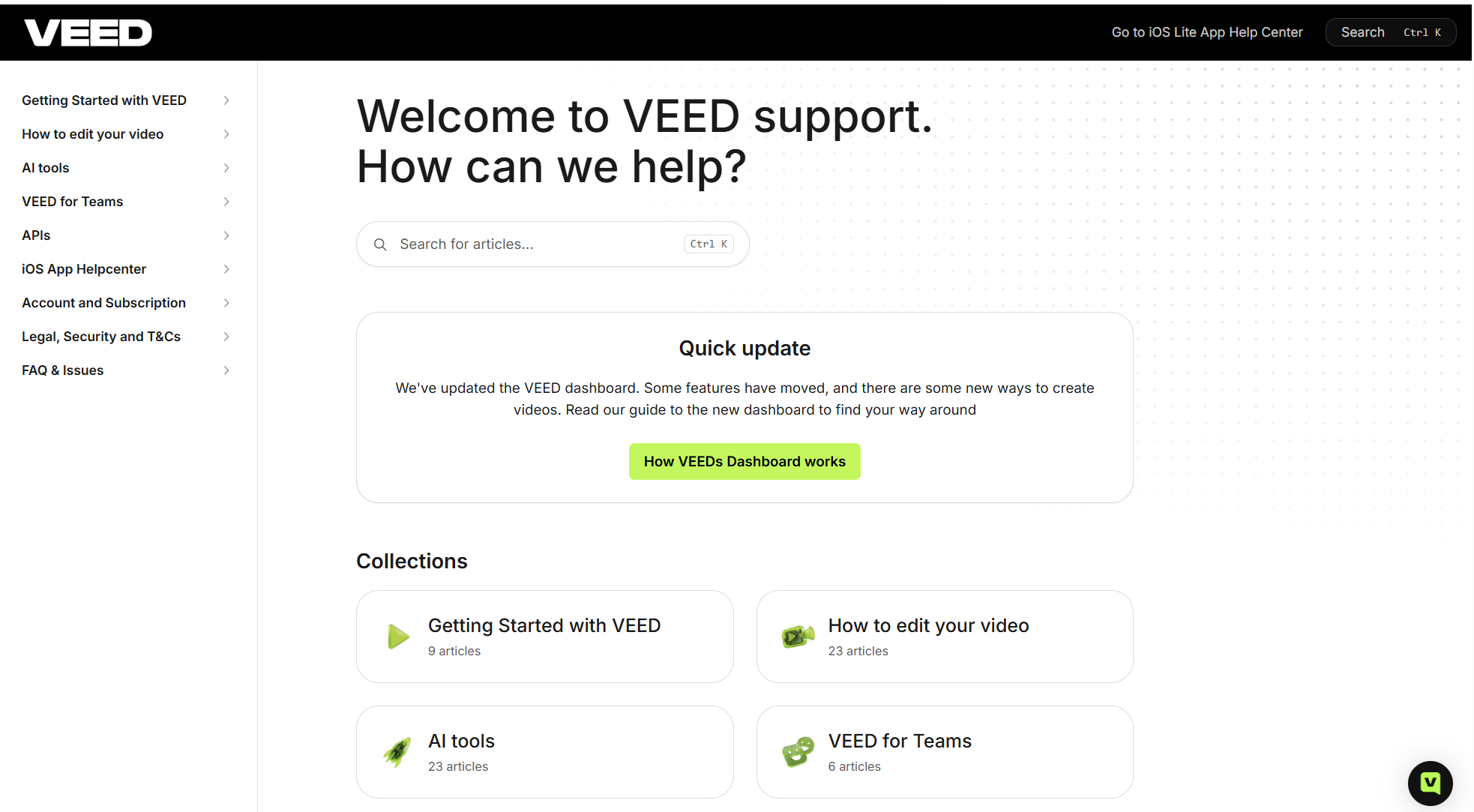
Veed, an online video editor, keeps its help center clean and uncluttered. A handful of collections cover getting started, editing, AI tools, and account topics, and articles lay out steps simply with screenshots throughout.
Veed keeps content current as features ship, and it now pairs the knowledge base with an AI agent that handles chat first and escalates to a human when needed. That combination – tidy docs plus an AI front line – is quickly becoming the default for modern SaaS support.
Fruity tip: Index your self-serve articles for search engines. Well-optimized help content ranks, attracts new users, and doubles as top-of-funnel marketing.
6. Visme – built around visual content
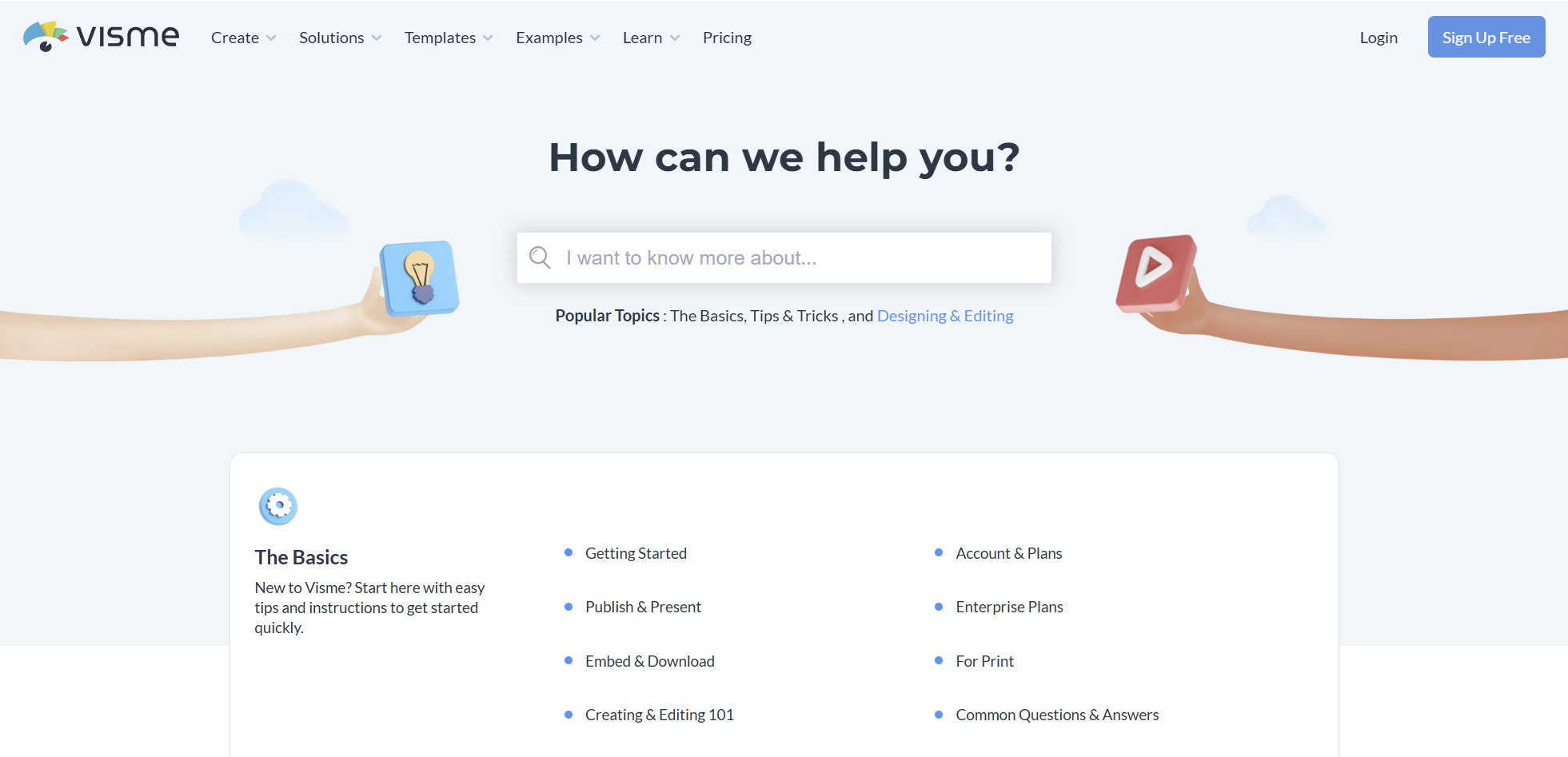
Visme helps non-designers create visual content, and its help center reflects that. Content is split into clear categories – the basics, project types, designing and editing, collaboration, and more – so users with different skill levels can find their level fast.
Articles are written plainly and paired with screenshots and videos that support the learning, while the branding stays subtle and out of the way. Visme proves you can cover a feature-rich product without overwhelming the person who just needs one answer.
Fruity tip: Write in the active voice and talk to the reader like you would on a call. Plain, direct language makes even complex tools approachable.
7. HubSpot – knowledge base plus academy
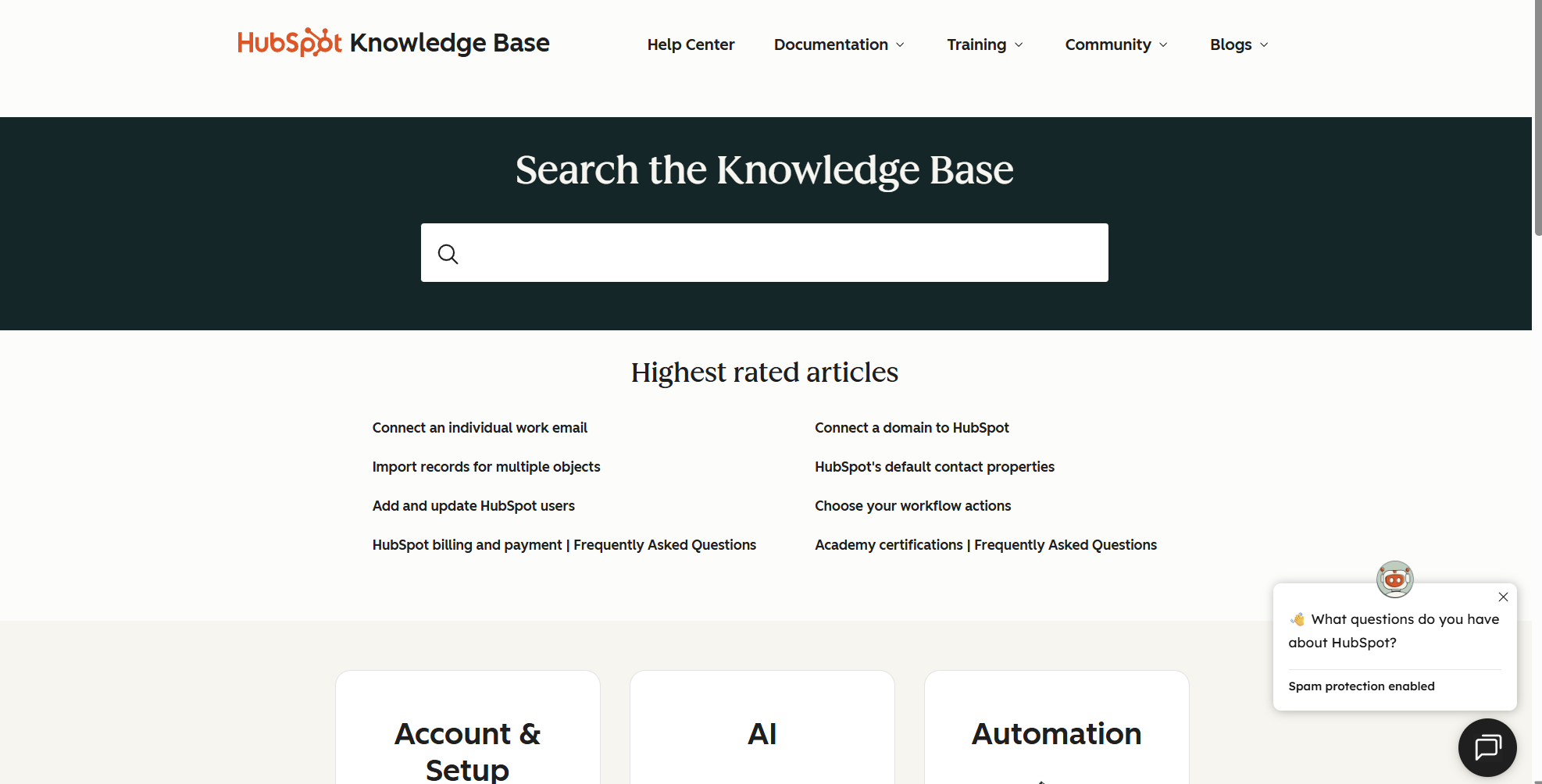
HubSpot pairs a deep knowledge base with HubSpot Academy, splitting quick fixes from structured learning. Need to solve a task now? The knowledge base has it. Want to master a tool? The Academy has a course. Keeping the two distinct means neither gets muddled.
The knowledge base itself is well-categorized and heavily cross-linked, so one answer leads naturally to the next. For B2B SaaS with a steep learning curve, this two-track model is worth copying.
Fruity tip: Separate "help me fix this" from "teach me this." Troubleshooting and education are different jobs and deserve different formats.
8. Dropbox – popular answers, front and center
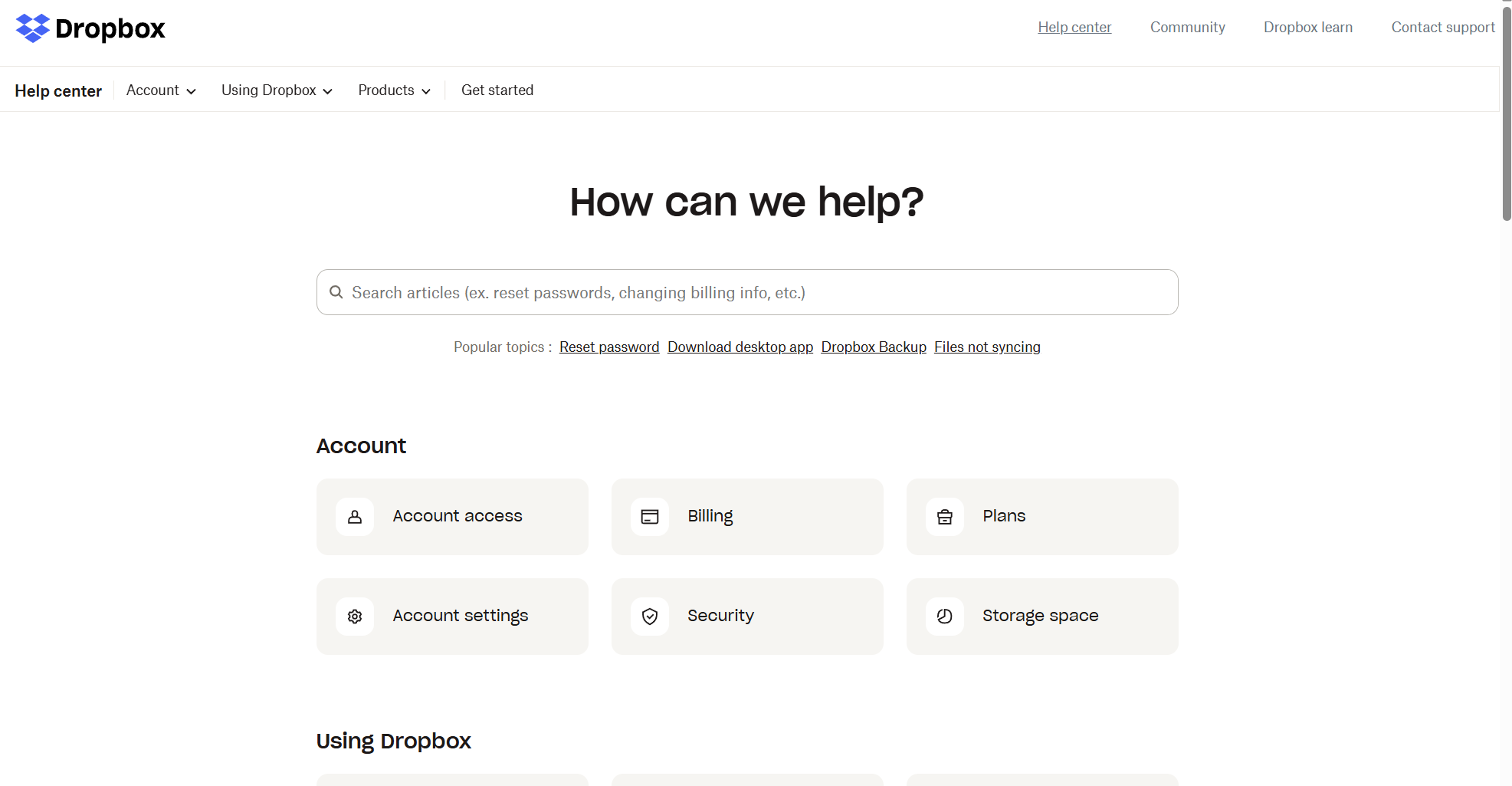
Dropbox organizes its help center around the questions people actually ask. The homepage groups content into Account, Using Dropbox, and Products, with popular topics and a short FAQ surfaced immediately, so common issues resolve in a click or two.
Related-article links inside each guide keep users moving without hunting, and Dropbox has added AI integration topics as its product line has grown. The lesson is discipline: lead with the few things most users need, and let everything else sit one layer down.
Fruity tip: Put your five most common questions where nobody can miss them. The majority of your traffic is looking for a small handful of answers.
Here is how the eight compare at a glance.
Build a knowledge base users actually use
The examples above share a pattern: help shows up when and where users need it. That is exactly what Product Fruits is built to do.
Product Fruits acts as an invisible layer on top of your app. You can build an AI-ready knowledge base with no code – upload existing docs or write new articles, add screenshots and video, and organize everything into clean categories. Access control lets you keep internal docs private with user verification and password protection, or publish a public help center on your own domain.
The difference is Elvin, the AI at the center of it. Instead of forcing users to guess keywords, Elvin understands plain language, typos, and intent, then delivers the answer inside your product. When a question needs more than an article, the Elvin Copilot can generate a step-by-step tour or hand off to a human. It is the same approach behind real outcomes: Nodes & Links cut support tickets by 25%, and Adeus now handles 60% of customer queries through Copilot and its knowledge base.
Knowledge does not have to sit in a static help center, either. With Flows, you can build multichannel, branching onboarding that reacts to what each user does and surfaces the right guidance in real time. And because your docs increasingly answer AI assistants too, the Product Fruits MCP integration lets tools like Claude, Cursor, and Codex securely read your workspace data over the Model Context Protocol – read-only, with OAuth sign-in and no API key to manage.
The result: fewer repetitive tickets, faster time to value, and a support team freed up for the work that actually needs a human.
Frequently asked questions
What is a SaaS knowledge base?
A SaaS knowledge base is a self-service library of articles, guides, FAQs, and videos that helps users solve problems and learn a software product on their own. The best ones are searchable, well-organized, and available inside the app, so users find answers without waiting on support.
What are good examples of SaaS knowledge bases?
Strong examples include Product Fruits, Slack, Stripe, Canva, Veed, Visme, HubSpot, and Dropbox. Each does one thing especially well – Slack keeps structure simple, Stripe treats docs as a product, Canva leads with video, and Product Fruits delivers answers inside the app through its Elvin AI widget.
What makes a knowledge base effective?
An effective knowledge base has forgiving search, three to six clear categories, popular answers surfaced up front, a consistent article format, helpful visuals, and visible last-updated dates. In 2026, it also needs clean structure and plain language so AI assistants and answer engines can pull accurate answers from it.
How does a knowledge base reduce support tickets?
A knowledge base lets users answer common questions themselves instead of opening a ticket. Many people are happy to resolve simple issues on their own, so clear, findable articles deflect repetitive requests. Pairing docs with an in-app AI assistant deflects even more, because help appears the moment users hit friction rather than after they have emailed support.
Should a knowledge base be inside the product or on a separate site?
Both, ideally. A public help center supports search engines and AI answer engines, while an in-app knowledge base catches users at the moment of confusion. Tools like Product Fruits let you do both from one source, so the same articles power your public docs and the in-app Elvin widget.
How do I make my knowledge base work with AI assistants?
Write clear headings, keep one idea per section, use plain language, and keep articles current. Clean structure is what lets AI search and in-app copilots parse your content and answer accurately. Product Fruits also offers an MCP integration so AI assistants can securely read your workspace data over the Model Context Protocol.
Conclusion
A great SaaS knowledge base is not about how many articles you have – it is about how fast the right answer reaches the user. The eight examples here all get there differently, but they share the same instinct: reduce the distance between a question and its answer. Keep search sharp, structure simple, content fresh, and help close to where users work.
Product Fruits helps you do all of that from one no-code platform, with Elvin AI delivering answers inside your product and Flows guiding users through the moments that matter. Want to see it on your own app? Try it out for free or Book a demo and we will map the fastest path to fewer tickets and faster activation.


Weekly newsletter
Get the latest releases, tips, articles, and exclusive interviews delivered to your inbox weekly—no spam!