40 Tested Prompts to Ask ChatGPT About Your Product Data in 2026


TL;DR
- Product Fruits MCP connects your AI assistant — ChatGPT, Claude, Cursor, or Codex — to your live Product Fruits data. Read-only, no API key, about two minutes to set up, free on every plan.
- We ran it on our own account before writing a word. In one afternoon it flagged a tour step to fix, a published flow that wasn't getting traffic, our biggest drop-off, and a support question worth a new help article.
- The 40 prompts we tested are near the bottom — grouped and copy-paste.
Most "prompt library" posts hand you a list and wish you luck. We wanted to know if this thing actually works, so before we published anything we connected Product Fruits MCP to our own production account and just started asking. It talked back — with our real numbers — and within an afternoon it had told us four things we didn't know that morning.
Here's what it found.
What it found in our own account
It caught a tour step worth a quick fix
We asked: "Do any tour cards have detected issues?" It flagged a tour card with a missing element and told us it had come up 59 times — the kind of small thing that's easy to miss by eye. Sorted the same day.
It flagged a flow no one was using
"Which of our published flows underperformed this month?" It surfaced one that wasn't getting traffic — a quiet bit of housekeeping that's hard to spot manually. A minute to review, and off the list.
It pinpointed our biggest drop-off
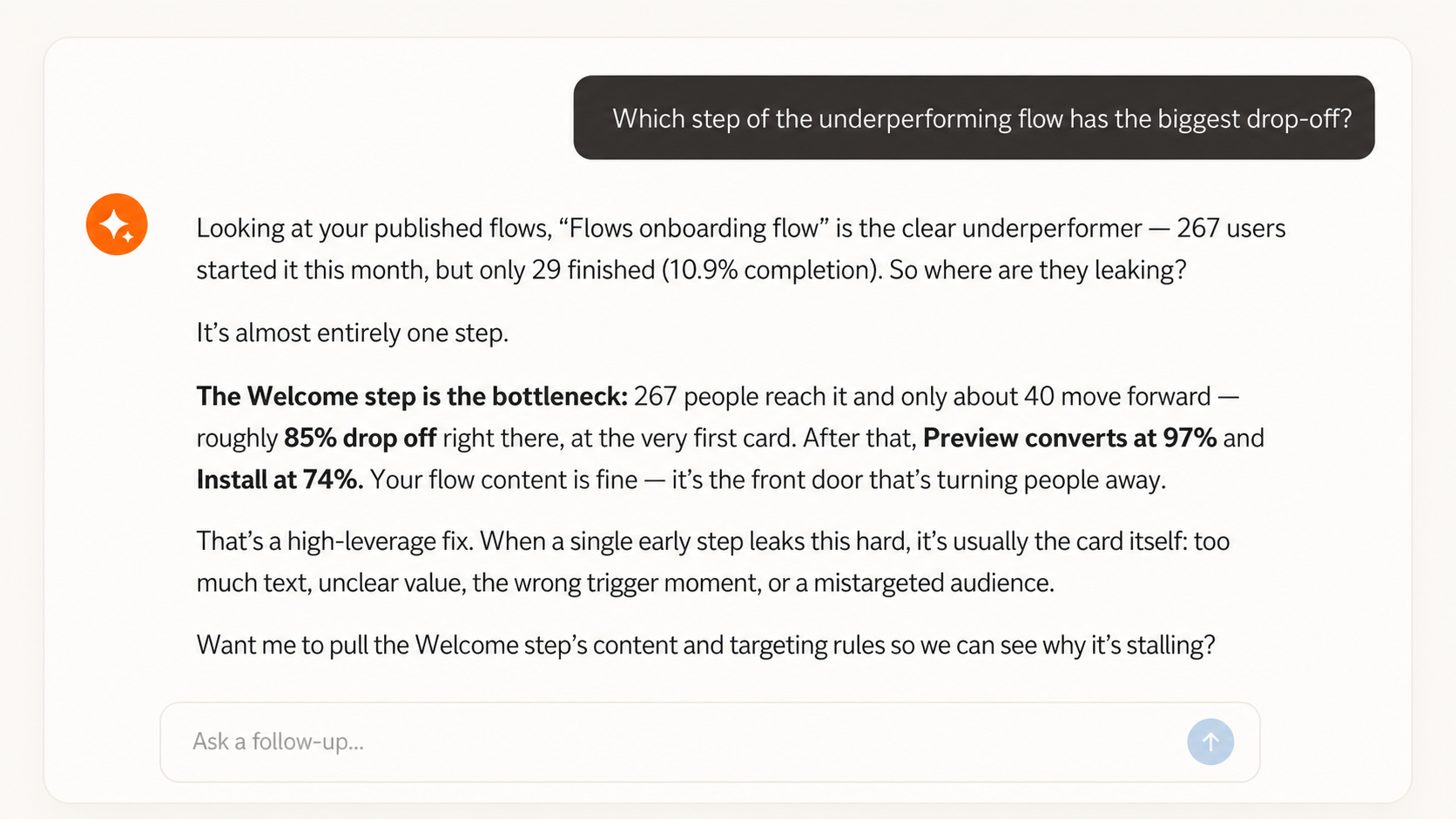
"Which step loses the most users?" Our welcome step was the bottleneck: of the 267 people who reached it, only about 40 moved forward — an 85% drop at the very first card, which is why the whole flow finished at just 10.9%. Not a hunch, not a quarterly review — a number, in seconds, pointing straight at where to focus next.
How it works (about two minutes)
You sign in with your Product Fruits account — no API key to generate, no developer, nothing to paste into a chat window. Your AI gets read-only access: it can look, it can't change or delete a thing. Then you ask in plain words. No prompting skills required.
For a lot of teams this is the first time an AI works with their own product data instead of the open web — which makes it about the safest first step you can take. Worst case, you get an answer you didn't want.
The 40 prompts we tested
Copy any of these, swap the [brackets] for your own flow, tour, survey, or user, and ask. We ran every one on our own account first — nothing here promises something the MCP can't do.
Start here
Two broad questions to see what it can do.
- "Give me an overview of my Product Fruits workspace."
- "How is my onboarding doing this month — and what's the one thing I should fix first?"
Find out where users get stuck
The money question: where your onboarding funnel leaks.
- "Which step of [flow name] has the biggest drop-off?"
- "Show me the per-step funnel for [flow name] over the last 30 days."
- "Compare the drop-off of [flow A] and [flow B]."
- "Show me the content and targeting of the step where most users leave."
- "Which of our published flows underperformed this month?"
- "Which tour cards have detected issues — broken URLs or missing elements?"
Hear what your users are really asking
Straight from your Elvin support conversations — the part no other tool does.
- "What did users ask Elvin this week?"
- "What are the most common topics in Elvin conversations this month?"
- "Show me unresolved or escalated conversations from the last 7 days."
- "Find Elvin conversations mentioning [feature name]."
- "Summarize recurring friction points from this month's conversations."
- "Which conversations got a thumbs-down, and why?"
Find your knowledge-base gaps
Where your knowledge base falls short of what users actually ask.
- "Which questions do users ask that our knowledge base doesn't answer?"
- "Search our knowledge base: [a real user question]."
- "What should we write next? Compare this month's Elvin topics against our existing articles."
- "Summarize what our KB says about [topic] so I can answer a customer."
Check performance without a dashboard
Your daily numbers, in one message.
- "How many users started the [flow name] flow this week?"
- "What's the completion rate of [flow name] this month?"
- "Compare [flow name]'s performance this month vs. last month."
- "How long do users spend on the [step name] step of [flow name]?"
- "How is the [tour name] tour performing — views, finishes, skips?"
- "Summarize this month's onboarding performance for a stakeholder update."
Understand your surveys
NPS and survey results, read for you.
- "Summarize the results of our [survey name] survey."
- "What are the common themes in the free-text answers of [survey name]?"
- "Show me our NPS breakdown — promoters, passives, detractors — and the trend."
- "List the individual responses to [survey name] from the last 30 days."
Know a user before the call
Context before the reply or the renewal.
- "What has [user@email.com] done in the product in the last 30 days?"
- "Did [user@email.com] finish the onboarding flow — or where did they stop?"
- "Has [user@email.com] seen the [announcement name] announcement?"
- "Show me [user@email.com]'s survey responses and feedback."
- "List everyone from [company domain] and what they've done recently."
- "Which users reached the [step name] step of [flow name]?"
Audit your workspace
Find what's stale, unpublished, or forgotten.
- "How much content do we have — and how much of it is actually published?"
- "List unpublished flows that haven't been edited in 2 months."
- "What content is currently targeting our trial users?"
Ask Product Fruits itself
Answers from our docs, without leaving your AI.
- "How do I trigger a tour based on a custom event?"
- "What's the difference between a tour and a flow?"
Go cross-tool
Where it gets unfair — combine Product Fruits with your other connectors.
- "Cross-reference our at-risk accounts in [your CRM] with their Product Fruits onboarding activity." (works when your CRM is connected to the same AI assistant.)
Three tips that make every answer better
- Name things precisely. "Completion rate of the New User Activation flow, last 30 days" beats "how's onboarding doing?" — though vague works too; your AI will list your flows and ask which you mean.
- Drill down in the same chat. Start broad, then: "show me the actual conversations" or "break it down per step."
- Save your morning routine. The second question above is a one-message daily check on its own; or save the performance set for the full readout.
What it can't do (yet)
It's read-only, on purpose. Your AI can't create, edit, or delete anything, and because you connect with your sign-in rather than a pasted API key, there's no admin credential in a chat window — it only ever sees what your own account is allowed to see. Analytics need published content with real activity in the range you ask about. Write access is on the roadmap once our permission model is fully hardened — your AI should earn trust before it gets a pen.
FAQ
What is Product Fruits MCP?
A connection that gives your AI assistant read-only access to your Product Fruits data — flows, tours, surveys, knowledge base, Elvin conversations, and user activity — so you can ask about your onboarding in plain language and get answers from your live account.
Is it safe to connect AI to my product data?
Yes. It's read-only, so nothing can be changed or deleted, and you connect with your Product Fruits sign-in rather than a pasted API key, so your AI only ever sees what your own account is allowed to see.
Which AI assistants does it work with?
Any that support the open MCP standard, including ChatGPT, Claude, Cursor, and Codex.
What does it cost?
Free on every Product Fruits plan.
Try it on your own onboarding
Already using Product Fruits? Sign in and connect your AI assistant — about two minutes, no API keys. Connect guide
New here? Start free, get your onboarding live in about 15 minutes, then point your AI at it. Start free
Your account will have its own surprises. Go find them.


Weekly newsletter
Get the latest releases, tips, articles, and exclusive interviews delivered to your inbox weekly—no spam!