How Can I Use AI to Actually Increase Product Adoption? 5 Proven Plays (and How to Deploy With Product Fruits)



Picture this: You launch a slick new feature. Marketing's pumped. Engineering's proud. You hit "ship"...and then crickets. Usage flatlines at 15%. Sound familiar?
The industry average core feature adoption rate hovers around 24.5%, revealing that many product investments never reach users' workflows. (How to Improve Feature Adoption: Best Practices in 2025 - Whatfix) That's R&D budget evaporating, stakeholder goodwill burning, and your roadmap credibility taking a hit.
But 2025 isn't 2023. AI has moved decisively beyond experimental phases into core business infrastructure, with organizations accelerating adoption as one of the most significant technological shifts of our time. (AI Adoption Statistics in 2025). Teams that ship AI for AI's sake vs. teams that deploy it to move the adoption metrics that matter.

What does "AI that actually increases adoption" mean in 2025?
Let's get specific. When your VP of Product asks "What's our AI strategy?", they're really asking: What adoption KPIs will move, and by how much?
The metrics that keep Product, PMM, Growth, and CS leaders employed:
- Activation rate – % of signups who hit the "aha moment"
- Time-to-value (TTFV) – Days from signup to first meaningful outcome
- Feature adoption rate – % of active users engaging with core features
- Day-30/90 retention – Stickiness beyond the honeymoon phase
- Support deflection rate – Tickets prevented by self-serve AI
Why do so many AI pilots miss impact? Because they start with the technology, not the outcome. Industry analysts note that AI has moved into core business infrastructure (AI Adoption Statistics in 2025), yet 66% of companies pursuing AI initiatives find establishing clear ROI metrics difficult. (Generative AI Adoption Statistics And Trends [2025])
Mike Krieger, Anthropic's CPO, calls out the shift from "AI FOMO" to metric-led programs: companies now demand clear success metrics and evaluation plans upfront. Going in without baselines, instrumentation, and rollback plans? That's how pilots get cut in Q2.
This guide gives you five deployable plays – complete with data requirements, stack options, step-by-step runbooks, metrics, and guardrails – so you can move from "we should do something with AI" to "we lifted activation 18% in 6 weeks."
Play 1 — In-app AI copilot grounded in your docs: How do you deploy a RAG chatbot that drives onboarding and feature discovery?
Think of your product docs as a library. Users need answers, but they don't want to become librarians. They want a smart assistant who knows exactly where to look and hands them the right page – instantly.

Why this increases adoption
Users can simply ask a question and receive a clear, accurate answer in seconds, making onboarding much smoother. (Building an Employee Onboarding Chatbot with RAG, FastAPI, and AI | Towards AI) Well-implemented assistants reduce setup friction, accelerate time-to-value, and deflect repetitive "how do I…?" tickets.
A Flask-based onboarding chatbot implementation reduced HR's involvement in routine queries by up to 50% and improved new hire satisfaction. (GitHub - urooj-akmal/Onboarding-Chatbot) Product Fruits customers report even stronger results: Copilot automatically resolves 66% of support questions, with some teams seeing up to 60% of customer queries handled without human intervention.
What is RAG and why use it for product docs?
Retrieval-Augmented Generation (RAG) combines the power of large language models with your specific product knowledge. Instead of the AI making up answers, it retrieves relevant sections from your actual documentation and uses those to generate accurate, contextual responses. This means users get answers grounded in your real docs—not hallucinations.
What data do you you need?
Your copilot is only as good as what it can retrieve. You need:
- Sources: Product documentation, help articles, FAQs, video transcripts, release notes, best practices guides
- Metadata: Article categories, user role relevance (admin vs. end-user), plan/tier restrictions, language/locale, last updated dates
- Instrumentation: Query logs, thumbs up/down ratings, escalation triggers, resolution tracking, conversation transcripts
Step-by-step deployment using Product Fruits
Product Fruits Elvin Copilot provides a turnkey RAG-powered assistant that connects directly to your knowledge base and learns your product deeply.
1. Connect your knowledge sources (Week 1)
- Add existing documentation to the Product Fruits Knowledge Base or create new articles
- Include screenshots, videos, step-by-step walkthroughs, and reference cards
- Organize content with categories, tags, and access controls (public vs. internal)
- Elvin automatically indexes and learns your content structure
2. Configure Elvin AI copilot (Week 1)
- Embed the Elvin widget in your product interface
- Configure URL filtering to exclude pages where Elvin will not be active (if needed)
- Set up multilingual support—Elvin automatically switches to users' preferred languages
3. Set resolution thresholds and escalation (Week 2)
- Configure confidence thresholds: Below threshold? Surface top 3 articles or escalate to human support
- Set up "Maximum Resolutions" cap to control costs (Product Fruits charges $0.69 per resolution after included monthly allotment)
- Start conservative: expect 30-40% resolution rates initially, ramping to 40-60% after optimization
- Enable automatic escalation to human agents when Copilot can't resolve queries
4. Launch in trial mode (Week 2)
- Use Product Fruits' trial period (unlimited resolutions up to 3,000 fair-use cap) to validate performance
- Monitor actual resolution rates and adjust knowledge base content based on gaps
- Track queries, deflections, thumbs up/down, and conversation patterns
5. Instrument and iterate (Ongoing)
- Review weekly: What queries fail? What content is missing?
- Improve docs and FAQs, not just prompts—better source content = better answers
- Product Fruits provides adoption intelligence showing where users struggle most
- Monitor resolution rates, escalations, and user satisfaction scores
Real-world results:
- Chemsoft reduced support tickets by 30% using the integrated knowledge base and Copilot
- Adeus now delivers round-the-clock customer support with Copilot handling 50-60% of queries
- Outsmart increased support ticket resolution by 26%
Where to place it in-product
- Primary: Home dashboard, setup pages, first-run experiences
- Secondary: Across the entire product if appropriate
- Activity triggering: On error pages, after idle time, or when users repeatedly click the same area
Metrics and targets
- Self-serve resolution rate – Target 40%+ within 90 days (Product Fruits customers report 60%+)
- "How to" ticket reduction – Aim for 20-30% deflection (proven: 26-30% reductions)
- TTFV improvement – Measure days from signup to first value (Keboola saw 29% faster onboarding)
- Copilot CSAT – Track thumbs up/down; maintain >70% satisfaction
Play 2 — How to use predictive activation and churn models to help you trigger the right nudge at the right time?
Going in blind and building features without knowing who's stuck is like throwing darts in the dark. You might hit something, but you'll waste a lot of ammo.
Why this increases adoption
Churn prediction helps identify customers who are likely to stop using your product, enabling you to anticipate customer churn before it occurs by analyzing historical customer data and surfacing early warning signs. (Mastering Churn Prediction: Strategies for Improved Customer Retention) Predictive models score users by likelihood to activate or stall, so you can trigger just-in-time nudges, auto-surface guides, or prompt CSM outreach before they ghost you.
What data you need
Your model is only as smart as the signals you feed it:
- Core events: Sign-up, invite teammate, connect integration, create first project, import data, use key feature N times, export/share, set permissions
- Friction signals: Errors, repeated failures, help views, idle sessions, repeated clicks on same area
- User attributes: Role, plan/tier, language, device, industry
- Account attributes: Seats, ARR, company size, time since signup
How to deploy with Product Fruits
Product Fruits uses Custom Events to trigger behavioral flows based on real-time user actions—the foundation of predictive intervention.
1. Instrument key events (Week 1-2)
- Define your "activation" milestone (e.g., "created first project + invited teammate + connected integration")
- Track events using Product Fruits SDK or via integrations with your CRM/analytics stack
- Tag events with metadata: user role, plan tier, feature usage patterns
- Set up negative signals: errors, abandoned flows, help doc views without resolution
2. Build behavioral segments (Week 2)
- Create cohorts based on event combinations and time windows:
- "Signed up 7 days ago BUT hasn't created first project"
- "Used feature X 3+ times in week 1 BUT dropped to 0 in week 2"
- "Viewed help docs 5+ times without resolution"
- Product Fruits allows event targeting (show content to users who performed actions) and event triggering (launch flows when events occur in real-time)
3. Deploy adaptive nudges (Week 3)
- Stuck on setup? → Trigger contextual tour showing exact next steps
- Feature usage dropping? → Surface onboarding checklist highlighting value they're missing
- Repeated errors? → Auto-launch Copilot offering help on that specific task
- Idle for 48 hours? → Send in-app announcement with quick-win suggestions
4. Test and score (Week 4+)
- Use Product Fruits Custom Events to trigger different intervention strategies
- Combine events with user attributes for precision targeting (e.g., "power users" vs. "beginners")
- Tie interventions to activation moments where users can see value immediately
- Measure completion rates for each triggered flow
Real-world impact:
- Product Fruits customers report +14% NPS improvement from event-triggered experiences
- FitnessPlayer cut customer churn by 70% using adaptive onboarding nudges
- Doubled trial conversion rates through behavioral targeting
Minimum viable model and QA
Start simple:
- Week 1-2: Track 5-10 core events defining activation
- Week 3-4: Create 3 behavioral cohorts (activated, at-risk, stalled)
- Week 5+: Deploy 2-3 intervention flows per cohort
- Month 2: Measure lift vs. control group (no interventions)
QA checklist:
- Are events firing correctly? (test in staging with Product Fruits' safe deployment)
- Are segments mutually exclusive and comprehensive?
- Do nudges feel helpful or spammy? (monitor user feedback)
- Are you measuring both engagement (CTR) AND outcomes (activation, retention)?
Metrics to watch
- Lift in activation rate vs. control (target: +10-20%; Product Fruits users see +14% NPS)
- TTFV reduction (days from signup to first value; Keboola achieved 29% faster onboarding)
- Nudge CTR → completion rate (measure engagement through the funnel)
- Day-30 retention (FitnessPlayer cut churn by 70%)
Play 3 — How to Replace static A/B tests with contextual bandits to personalize onboarding sequences
A/B tests are like giving everyone the same medicine and seeing what works on average. Contextual bandits are like a doctor prescribing based on your symptoms, history, and allergies.
Why this increases adoption
A/B testing isn't changing allocation even after seeing evidence that treatment is better; multi-armed bandits dynamically update traffic but still don't personalize; contextual bandits both change allocation and personalize treatment, hence superior performance. (An Overview of Contextual Bandits | Towards Data Science)
A/B testing is fundamentally a one-size-fits-all approach; contextual bandits are the smart middle ground between basic A/B tests and full-blown machine learning, delivering on personalization without breaking your infrastructure. (Contextual bandits: Personalized testing at scale)
When to use A/B vs. contextual bandits
Use A/B for:
- Big, risky changes (pricing, core UX overhauls)
- When you need a fixed, auditable effect size
- Clean counterfactuals for stakeholder buy-in
Use contextual bandits for:
- Multiple "safe" variants (onboarding flow order, template selection, checklist sequence)
- Fast outcome feedback (activated within 7 days, completed checklist)
- When you want per-user personalization
A/B testing assumes there's a single "best" experience for all players; often, this is wrong – players are unique and come from different backgrounds. (Enhanced Optimization: When A/B Testing Falls Short, Contextual Bandits Are the Answer)
How to deploy with Product Fruits
While Product Fruits doesn't explicitly market "contextual bandits," its platform enables adaptive, personalized experiences through AI-powered tour generation and behavioral targeting—achieving similar outcomes.
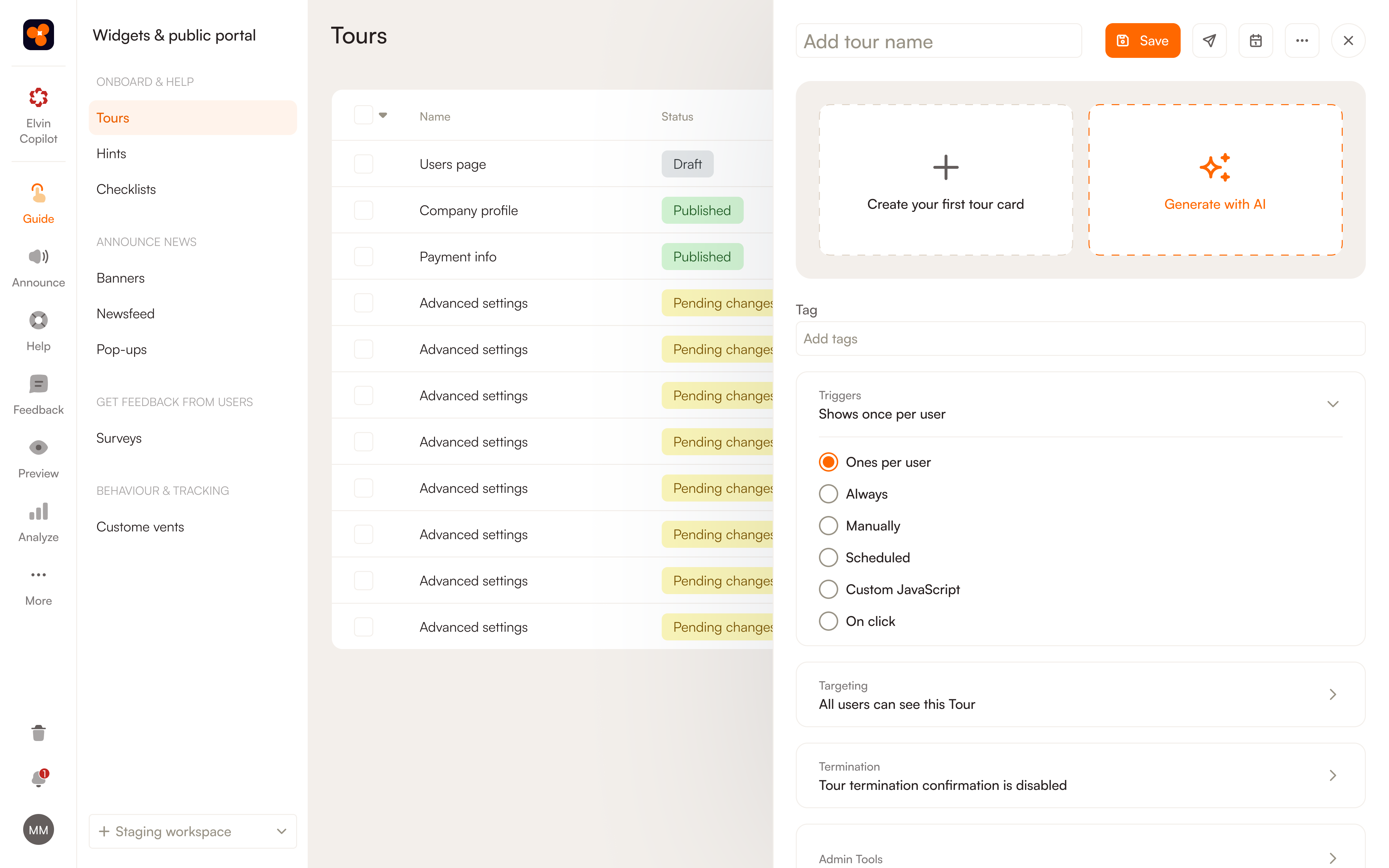
1. Create tour variants using AI (Week 1)
- Generate different messaging approaches: benefit-focused, feature-focused, use-case-focused
- Create variants optimized for different user segments (technical vs. non-technical, admin vs. end-user)
2. Set up behavioral targeting (Week 1-2)
- Use Custom Events to segment users by behavior patterns
- Configure event targeting: Display specific tours to users based on their actions
- Set up time-bound targeting: Reach users who perform events within specific timeframes
- Combine user attributes (role, plan, device) with behavioral signals for precision
3. Deploy adaptive tours with Elvin (Week 2-3)
- Product Fruits' Elvin AI creates "endless personalized variations" that adapt to each user's needs
- Tours adjust based on individual user goals and progress rather than one-size-fits-all
- When users ask "how do I...?" questions, Elvin automatically generates contextual step-by-step tours
- The system learns from user interactions to improve recommendations over time
4. Measure and optimize (Week 4+)
- Track completion rates, activation lift, and time-to-value for different tour variants
- Monitor which segments respond best to which tour types
- Use Product Fruits analytics to identify adoption blockers in plain language
Real-world results:
- Product Fruits' adaptive approach delivers "35% jump in adoption in the first month" (case study)
- Doubled trial conversion through personalized experiences
- 29% faster onboarding (Keboola) through targeted, adaptive flows
Key insight: Product Fruits' strength isn't traditional A/B testing—it's AI-powered, behavior-driven personalization that adapts tours dynamically to each user's context. This achieves the goal of contextual bandits (personalization at scale) without manual testing infrastructure.
Play 4 — How can you use AI to generate and localize onboarding copy and media without losing brand control?
Imagine you're launching in 12 new markets. Traditional localization? Weeks per language, $$, and a bottleneck that kills velocity. AI localization? Days, controlled by glossaries and tone guides, with humans reviewing critical paths.
Why this increases adoption
Faster iteration on tooltips, tours, and checklists means you can test more, ship faster, and meet users in their language. Localized experiences reduce friction and lift activation in new markets.

How to deploy with Product Fruits
Product Fruits Elvin AI provides multilingual, AI-powered content and guidance generation built directly into the platform.
1. Generate tour copy with AI (Minutes, not hours)
- Click "Generate with AI" within any tour, tooltip, announcement, or checklist builder
- Describe what you want to communicate in plain language
- AI generates professional copy instantly: "Write copy in seconds"
- Automatically fixes grammar errors and enhances copy quality
- Iteration speed: Generate 5 variants in 10 minutes vs. 2 hours manually
2. Optimize for different UI contexts (Instant)
- AI automatically "shortens copy to fit templates" for modals, tooltips, banners
- Generates variations for different user segments without manual rewriting
- Maintains consistent tone across all in-app messaging
3. Deploy multilingual support (Built-in)
- Elvin Copilot provides automatic multilingual support, switching to users' preferred languages instantly
- Knowledge base content can be organized by language/locale with granular access controls
- Tours, tooltips, and checklists can be versioned per language
4. Maintain brand control (Governance layer)
- Set up approval workflows before content goes live
- QA tours on staging environment using Product Fruits' "100% safe" integration
- Use the Chrome extension or tag manager for 5-minute setup and testing
- Deploy to production only after validation—no risk to source code or functionality
5. Measure localization impact (Analytics)
- Track completion rates and activation metrics per language/region
- Identify which locales have higher/lower adoption and adjust content accordingly
- Use Elvin's adoption intelligence to see where non-English users struggle most
Real-world efficiency gains:
- Setup time: 5-minute deployment via tag manager
- Content generation: "Write copy in seconds" vs. hours manually
- Localization support: Built-in multilingual capabilities without separate translation services
- Safe iteration: Build and QA on staging, deploy when ready
Metrics
- Copy iteration speed – Generate 5 tour variants in 10 minutes (vs. 2 hours manually)
- Localized activation lift – Measure activation rates in new markets with localized tours
- "Confusing copy" feedback reduction – Track support tickets and user feedback about unclear messaging
- Time to launch in new market – Days with AI localization vs. weeks with traditional translation
Key advantage: Product Fruits integrates AI content generation directly into the platform, eliminating context-switching between translation tools, doc editors, and your product. Write, test, and deploy in one workflow.
Play 5 — How do you use AI to scale customer support without losing the human touch?
Traditional support is a zero-sum game: every new customer means more tickets, which means hiring more support agents. AI support flips this equation: handle more users without proportionally scaling headcount, while keeping humans focused on complex, high-value interactions.
Why this increases adoption
Support friction is adoption's silent killer. When users hit a blocker and can't get instant help, they churn. But hiring support agents for 24/7 coverage across time zones and languages? Expensive and slow. AI support provides instant, accurate answers at scale while escalating complex issues to humans—keeping users moving forward instead of stuck.
What AI customer support actually means
Not a chatbot that frustrates users with canned responses. Product Fruits' Elvin Copilot is an AI assistant grounded in your real documentation that:
- Understands natural language, even when users don't know how to ask properly
- Generates contextual answers pulled directly from your knowledge base (RAG-powered)
- Creates step-by-step tours automatically when users ask "how do I...?" questions
- Escalates intelligently to human agents when confidence is low or complexity is high
- Works 24/7 across languages, automatically switching to users' preferred language
What data you need
Your AI support is only as good as its knowledge sources:
- Support ticket history: Common questions, resolution patterns, escalation triggers
- Product documentation: Help articles, FAQs, video transcripts, troubleshooting guides
- User context: Role, plan tier, language, recent actions, error logs
- Resolution metrics: Which queries get resolved, which escalate, user satisfaction scores
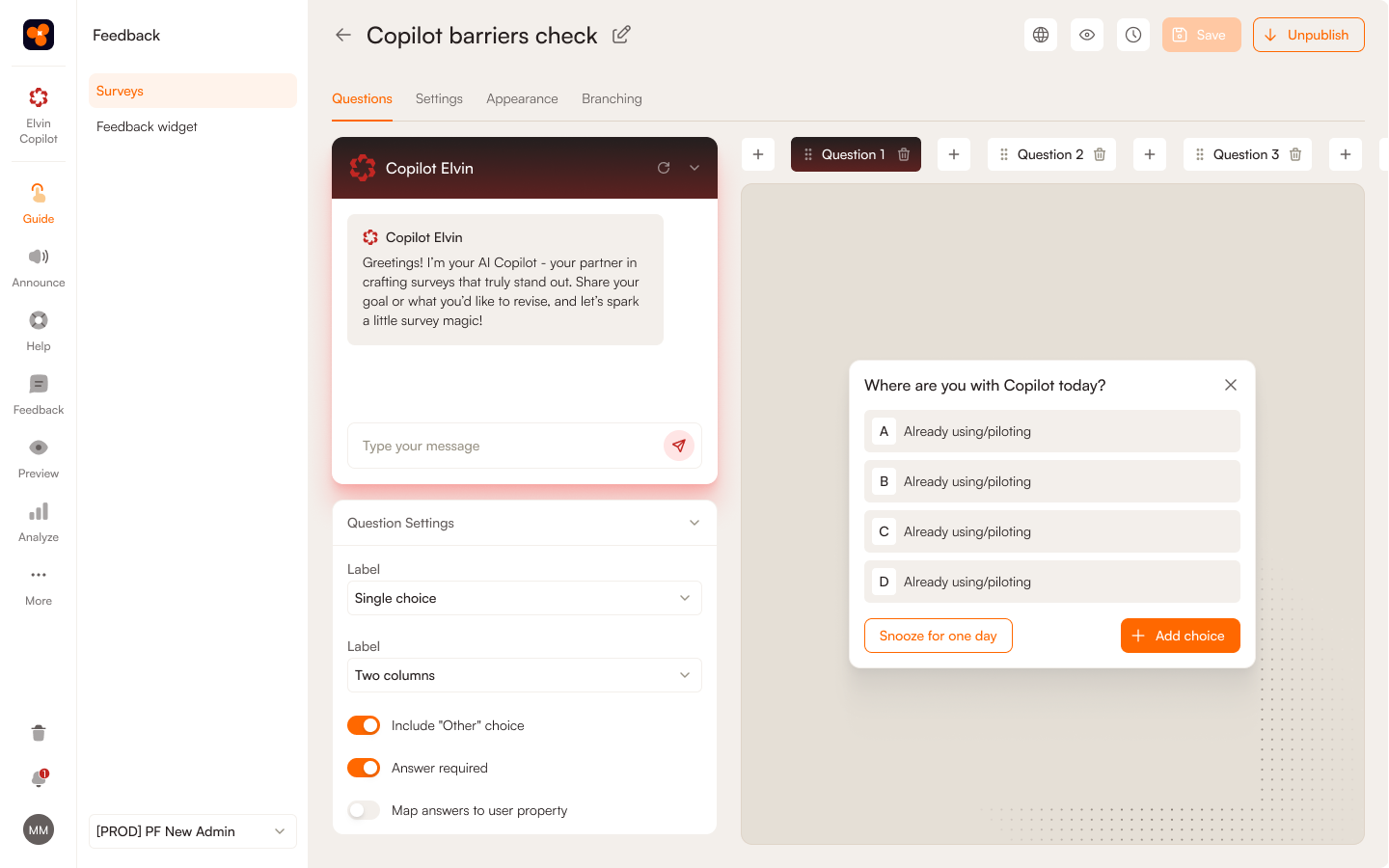
Step-by-step deployment using Product Fruits
1. Audit and index your knowledge base (Week 1)
- Migrate existing help docs to Product Fruits Knowledge Base
- Structure content with categories, tags, and access controls (user-facing vs. internal)
- Make sure any rich media (images, videos etc.) intended for humans are also described in text for AI
- Elvin automatically indexes content and learns product terminology
2. Connect Copilot to high-friction touchpoints (Week 1)
- Activate/Embed the Copilot widget in your product
- Configure URL filtering to exclude pages where Elvin will not be active (if needed)
- Configure contextual triggers: surface automatically on help doc views, repeated errors, or idle time
- Set up multilingual support (Elvin auto-detects user language preference)
3. Configure resolution and escalation logic (Week 2)
- Start conservative: Set initial resolution rate expectations at 30-40%
- Set cost caps: Configure "Maximum Resolutions" limit to control spend ($0.69/resolution after free monthly allotment)
- Define escalation triggers:
- Confidence score below threshold → surface top 3 articles or escalate
- User clicks "talk to human" → pass full conversation context to agent
- Negative feedback after response → flag for human review
- Connect to existing support tools: Integrate with Zendesk, Intercom, or Jira for seamless escalation
4. Launch in trial mode and validate (Week 2-3)
- Use Product Fruits' trial period (unlimited resolutions, 3,000 fair-use cap) to test real performance
- Monitor actual resolution rates—target 30-40% initially, optimizing to 40-60%
- Track escalation patterns: What questions fail? What knowledge gaps exist?
- Calculate estimated monthly resolutions:
Historic Tickets × Resolution Rate
5. Optimize knowledge base based on gaps (Week 4+)
- Review Copilot conversation logs weekly to identify recurring unresolved queries
- Improve base content (add missing articles, clarify confusing sections)
- Better source content = higher resolution rates and fewer escalations
- Product Fruits surfaces adoption blockers in plain language, showing exactly where users struggle
6. Monitor costs and performance (Ongoing)
- Track weekly during first month, then monthly thereafter
- Watch metrics: resolution rate, escalation rate, user satisfaction (thumbs up/down), ticket deflection
- Adjust "Maximum Resolutions" cap as needed (set 15-25% above expected volume, with 80% alert threshold)
- Iterate on knowledge base content to improve quality, not just AI prompts
Where to place AI Copilot in-product
- Primary access: Persistent Elvin widget visible on every page
- Configure URL filtering to exclude pages where Elvin will not be active (if needed)
- Onboarding integration: Embed in tours with "Need help?" prompts
- Resource center: Make Elvin AI Copilot the first option in your help menu
Real-world results
Product Fruits customers report dramatic support deflection:
- 66%+ of support questions are being resolved automatically across customer base
- Adeus: 50-60% of queries handled without human intervention, all live support is covered by AI Copilot
Metrics and targets
- Resolution rate: Target 40-60%+ after optimization (start at 30-40%)
- Ticket deflection: Aim for 20-30%+ reduction in "how to" tickets (proven: 25-30% reductions)
- Escalation quality: When Copilot escalates, human agents resolve 80%+ of tickets (high confidence escalations)
- User satisfaction: Maintain 70%+ positive feedback (thumbs up) on Copilot responses
- Cost per resolution: $0.69 (Product Fruits pricing), compare to your previous costs (industry average $5-15) cost of human ticket resolution
- 24/7 coverage: Measure off-hours query volume handled without human agents
The hybrid model: AI + human excellence
Product Fruits Copilot doesn't replace support teams—it amplifies them:
AI handles (60%+ of volume):
- "How do I...?" questions with clear answers in docs
- Account/billing FAQs
- Feature usage guides
- Troubleshooting with known solutions
Humans handle (40% of volume, but high-value):
- Complex technical issues requiring diagnosis
- Edge cases not covered in documentation
- Account-specific configuration requests
- Escalations where users are frustrated and need empathy
The result: Support teams shift from repetitive ticket grinding to strategic customer success work—onboarding high-value accounts, driving expansion, and improving product based on feedback patterns.
Cost comparison: AI vs. traditional support scaling
Traditional model (scaling support with users):
- 1 support agent handles ~50-100 tickets/week at $50K-70K/year
- 1,000 monthly tickets = 3-5 agents = $150K-350K annual cost
- Doesn't scale geographically (need agents per time zone/language)
AI-powered model (Product Fruits Copilot):
- Base cost: 20-40 included resolutions/month + $0.69 per additional resolution
- 1,000 monthly tickets × 50% resolution rate = 500 AI resolutions = ~$330/month = $3,960/year
- Savings: $146K-346K annually vs. hiring 3-5 agents
- Scales instantly across time zones and languages
ROI timeline:
- Month 1: 30-40% resolution rate, validate with trial
- Month 2-3: Optimize to 50-60% resolution rate
- Month 4+: Sustained 25-30% ticket deflection, measurable cost savings
How to get started when using AI for your product adoption
You now have five plays proven to move adoption metrics. Here's how to deploy:
Week 1-2: Pick ONE play
- Copilot if support tickets are your #1 pain
- Predictive nudges if onboarding drop-off is the problem
- AI content generation if you're scaling to new markets
Week 3-4: Instrument baselines
- Measure current state: activation rate, TTFV, support volume
- Set clear targets: e.g., "Lift activation from 24% to 35% in 90 days"
Week 5-8: Deploy with guardrails
- Launch in trial/pilot mode with cost caps and escalation rules
- Monitor weekly: resolution rates, user feedback, adoption lift
- Iterate on content and targeting, not just AI prompts
Month 3+: Scale what works
- Add second play if first is validated
- Share wins with stakeholders (tie to revenue/retention metrics)
- Build adoption playbooks around proven interventions
FAQs
What's the simplest AI project I can ship in 2 weeks to improve activation?
Add a RAG-grounded in-app assistant on your setup pages, plus a checklist that triggers when risk signals appear (e.g., no integration connected at 24h). Start with your help center URL, enable citations, confidence thresholds, and human handoff; measure deflection and TTFV deltas. You can deploy with ProductFruits in days, not months.
Which onboarding events matter most for training a predictive model?
Focus on early "aha" events (project created, data imported, first export/share), teammate invites, key feature-use counts, and friction/intent signals (errors, help views). Pull product usage data through event tracking, layer in NPS feedback, and add user attributes to uncover trends.
How do I measure the ROI of an in-app AI copilot vs. traditional docs?
Compare self-serve resolution rate, ticket deflection, TTFV, and assistant CSAT for exposed vs. holdout cohorts. Attach cost savings to deflected tickets (avg. support ticket cost × tickets deflected).
When are contextual bandits better than A/B tests for onboarding?
When you have multiple "safe" variants and fast outcome feedback (e.g., 7-day activation, checklist completion), contextual bandits are practical and deliver on personalization; stick with A/B for high-risk changes.


Weekly newsletter
Get the latest releases, tips, articles, and exclusive interviews delivered to your inbox weekly—no spam!