How to Reduce SaaS Churn Rate in 2026: Best Practices and Tools Across 5 Proven Strategies


Churn doesn't usually happen because your product is bad. It happens because users never truly understood it, never adopted it deeply enough, never got help when they needed it, or never felt heard when something went wrong. Each of those failure points is preventable - but only if you address it deliberately.
The SaaS teams with the lowest churn rates in 2026 share a common characteristic: they don't treat retention as a single initiative. They run it as a system of overlapping strategies, each targeting a different moment where users are most at risk of disengaging.
This guide focuses on five of the most impactful strategies for reducing SaaS churn - user onboarding, feature adoption, in-app feedback, self-serve support, and AI-powered assistance - with the best practices for executing each one, the metrics that matter, and a short selection of tools to help you get there.
Quick Answer
How to reduce SaaS churn rate: Address the five core churn drivers simultaneously - (1) accelerate time-to-value with structured onboarding, (2) drive feature adoption through contextual in-app guidance, (3) capture dissatisfaction early with NPS and in-app surveys, (4) reduce friction with self-serve support and knowledge bases, and (5) resolve "how do I?" questions instantly with AI assistance. Each strategy has dedicated tooling; the most efficient teams use a platform that covers all five in one place.
How much Churn is too much?
Data from Recurcly churn report shows, that in B2B SaaS median churn rate is at 3,5 % (this can be further broken down to 2,6 % of volutary churn - customer decides to churn, this is what we focus on with article you are reading, and 0,8 % involuntary - such as payment issues. Another data from Baremetrics illustrates that churn rates are overall higher for lower-tier (rate) subscriptions under $250 monthly, worst bracket being $25-$50. Adressing these churns with automated solutions for onboarding, adoption, feedback and support is most efficient way to reduce churn and improve bottom line.

The Real Cost of Monthly Churn: Annual Impact at a Glance
Monthly churn rates can feel deceptively small. A 3% monthly churn sounds manageable - but compounded over 12 months, it means nearly a third of your customers need to be replaced every year just to stand still. With just 2% monthly, you have to "replace" 21.5% customers annually only to keep you MRR. With 3.5% you are looking at almost 35% compounded churn and 6% monthly churn compounds to whopping 52.4% annually!
Why Churn Needs a Multi-Strategy Response
The most common mistake SaaS teams make with churn is treating it as a single problem with a single fix. In reality, churn is the aggregate outcome of many small failures - a confusing first session, a feature that was never discovered, a support question that went unanswered for too long, a survey that was never sent.
Research from Recurly found that voluntary churn accounts for approximately 73% of all SaaS churn - meaning the vast majority of departing customers made a conscious choice to leave. That's both sobering and encouraging, because conscious decisions can be influenced. The five strategies below target the specific moments that most often tip the decision in the wrong direction.
Strategy 1: Fix the Onboarding Experience
Why onboarding is the highest-leverage churn intervention
Poor onboarding is the leading cause of early churn in SaaS, and the numbers are stark. According to Agile Growth Labs' 2025 benchmark data, the average SaaS activation rate sits at just 37.5% - meaning nearly two-thirds of users who sign up never reach a meaningful "aha moment." Users who fail to engage meaningfully in their first three days are at dramatically elevated churn risk and are unlikely to return.
The financial stakes are equally clear: users who complete onboarding and reach their first value moment convert at 67%, compared to just 18% for those who don't, according to SaaS benchmarking research. And a 2024 Amplitude study found that cutting time-to-value by 20% correlated with an 18% lift in ARR growth for mid-market SaaS companies.
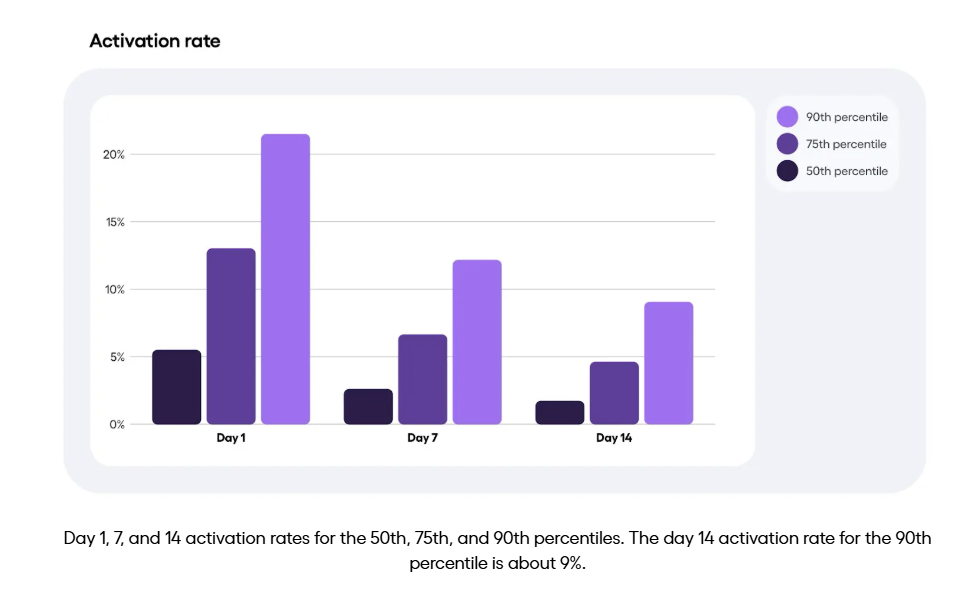
You are also chasing time, as retention drops with later activation. In other words: the sooner your users get to "aha moment" (percieving the product value), the more likely they will stay with you longer. Amplitude shows this nicely in their chart:
Best practice: what great onboarding looks like
Effective onboarding is not a product tour you show every new user once. It's a contextual, segmented, progressive system that meets users where they are and guides them toward a defined first-value milestone. The best onboarding flows share these characteristics you should follow:
Start with the user's goal, not the product's features. The fastest path to reducing early churn is helping users accomplish something meaningful as quickly as possible - not walking them through every button and menu. Map your onboarding to a specific "aha moment" (the first time a user experiences your product's core value) and engineer the shortest possible path to it.
Use progressive disclosure. Presenting everything at once overwhelms users. Best-practice onboarding introduces features in layers - a short interactive tour to establish the core workflow, followed by contextual hints and checklists that unlock as users advance.
Segment by user type. A first-time user in a startup has different needs than a power user onboarding at an enterprise. Segmenting onboarding by role, use case, or company size significantly improves completion rates and reduces early churn.
Measure and iterate. Track tour completion rates, checklist progress, time-to-first-key-action, and Day 7/Day 30 retention by onboarding cohort. These metrics tell you exactly where your onboarding flow breaks down and where to invest improvement effort.
Key KPI targets
- Activation rate: aim for above the 37.5% industry average; top quartile SaaS achieves 55%+
- Time-to-value: reduce to under 10 minutes for core use cases where possible
- Day-30 retention: onboarding-complete cohorts should retain at 2–3× the rate of incomplete cohorts
Tools for onboarding
Product Fruits - Product Fruits' interactive tours and onboarding checklists let non-technical teams build fully segmented, multi-step onboarding flows without engineering support. (Read how Mystore.no was convinced to switch after being able to have first working tour up and running in less than 10 minutes). Tours support element highlighting, video cards, tooltips, and progress indicators. Checklists create structured activation journeys with clear next-step prompts. Both can be triggered by user segment, lifecycle stage, or behavioral events - and completion data feeds directly into the analytics dashboard.

UserGuiding - A no-code digital adoption platform with solid onboarding flow building, checklist support, and NPS. Strong for teams needing a straightforward setup at competitive pricing, though with less AI capability than Product Fruits.
Appcues - A well-established onboarding tool with robust A/B testing for onboarding flows and good segmentation controls. Best suited to teams with mature experimentation practices, though it requires additional tools for NPS, feedback, and support.
Strategy 2: Drive Sustained Feature Adoption
Why shallow adoption predicts churn
Activation gets a user through the door. Feature adoption determines whether they stay. Research compiled by Pendo consistently shows that customers who adopt core features within their first 30 days retain at 2–3× the rate of those who don't. One analysis found that customers who regularly adopt new features are 31% less likely to churn than those who stick to a narrow subset of functionality.
The problem is that most software goes largely undiscovered. Research repeatedly shows that approximately 70-80% of software features receive little or no usage. Features that users don't know exist can't deliver value, and users who aren't receiving value churn.
The goal of a feature adoption strategy is to close the gap between what your product can do and what each user actually uses, at exactly the moment they're most likely to need it.
Best practice: making adoption contextual and continuous
The most effective feature adoption strategies don't rely on documentation, email newsletters, or hoping users stumble upon new capabilities. They deliver discovery inside the product, in context, at the right time.
Deploy contextual hints and tooltips. Rather than front-loading users with information they're not ready for, contextual hints surface guidance precisely when they reach a relevant feature or workflow step. This dramatically improves the chance of discovery without adding friction to the initial experience.
Use announcements for feature launches. Every time you ship a meaningful update, you have an opportunity to drive adoption - but only if users see it. In-app announcements (pop-ups, banners, newsfeeds) outperform email for feature awareness because they reach users while they're already in the product and in a discovery mindset.
Track feature-level engagement, not just logins. Logins are a poor proxy for retention. What predicts churn is whether users are engaging with the features that deliver your product's core value. Map your "retention-critical" features and monitor adoption rates per cohort; disengagement from these features is often a leading indicator of churn that shows up weeks before a cancellation.
Run NPS and surveys segmented by feature usage. Users who are active in one module but have never touched another are a specific retention opportunity. Targeted in-app nudges or surveys for low-adoption segments can re-engage users before they decide they're not getting value.
Key KPI targets
- Feature adoption rate: B2B SaaS averages 25–40%; top performers achieve 60%+
- Breadth of adoption: track how many retention-critical features each user has engaged with in the last 30 days
- Feature announcement engagement: aim for 20%+ open/engagement rates on in-app feature announcements
Tools for feature adoption
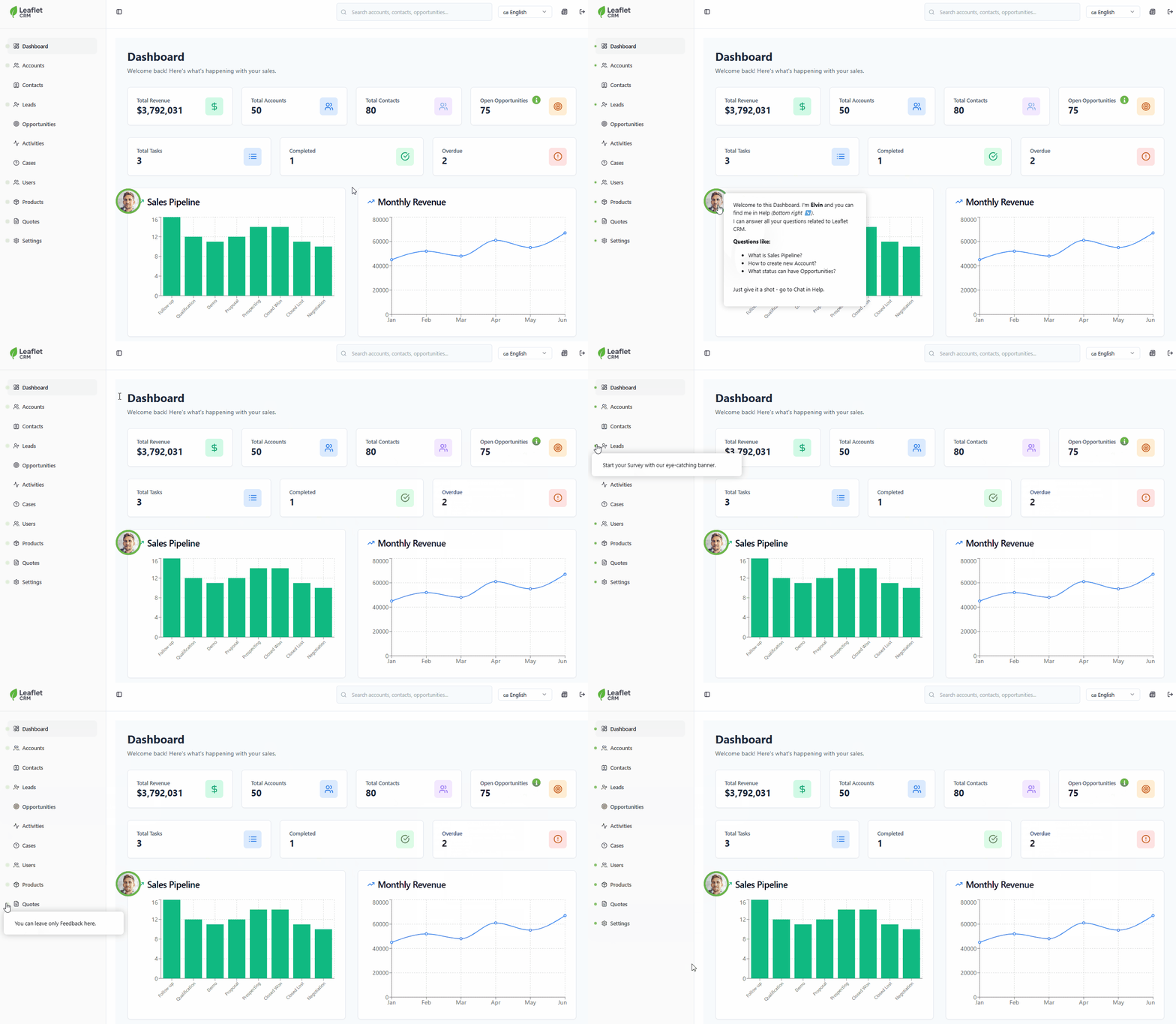
Product Fruits - Hints and tooltips surface contextual feature guidance inline, triggered by user behavior or specific UI elements. In-app announcements - including pop-ups, banners, and a persistent newsfeed - ensure feature launches reach users in-product rather than getting lost in email. Custom events let teams track specific feature interactions and trigger onboarding or re-engagement flows based on what users have and haven't done.
Pendo - A powerful digital adoption platform with deep analytics and in-app guidance. Pendo's strength is its product analytics layer, which makes it excellent for identifying which features correlate with retention. Its guidance tooling is strong but the platform is typically better suited to enterprise-scale teams.
Chameleon - A flexible in-app experience builder focused on product adoption, with strong support for tooltips, modals, and segmented feature announcements. Good for teams that want granular control over in-app messaging without a full DAP budget.
Strategy 3: Close the Feedback Loop with In-App Surveys and NPS
Why feedback is a churn early-warning system
Most users who churn never tell you why. They don't submit a cancellation reason, they don't send an angry email - they simply stop logging in. By the time you notice, the decision is usually already made.
In-app surveys and NPS are the most effective tools for surfacing that dissatisfaction while there's still time to act. Research via CustomerGauge found that companies with an NPS above 50 experience 20% lower churn rates compared to those with scores below 30, and grow 2.3× faster. More importantly, NPS and targeted surveys give CS teams an actionable list of at-risk users to reach out to proactively - often weeks before those users would otherwise churn.
The keyword is "in-app." Email NPS surveys suffer from low response rates (typically 5–15%) and selection bias - the users who respond by email are rarely the users most at risk of churning. In-app surveys presented at the right moment consistently achieve response rates of 20–40%, and they capture users who would never respond to an email.
Best practice: making feedback actionable, not just collected
Time surveys to moments of truth. The highest-quality feedback comes immediately after a meaningful experience - completing a key workflow, hitting a usage milestone, or experiencing a frustration. Surveys triggered by product events consistently outperform calendar-based sends in both response rate and signal quality.
Use NPS as a triage tool, not just a metric. NPS scores are most valuable when they automatically route responses into action: Detractors flagged to CS for immediate outreach, Passives enrolled in a re-engagement flow, Promoters invited to leave a review or become a reference. Treating NPS as a score to track rather than a signal to act on wastes most of its churn-prevention value.
Go beyond NPS with targeted micro-surveys. NPS tells you the outcome (satisfaction level); follow-up questions tell you the cause. Churn-check surveys ("Is there anything preventing you from getting full value?"), feature feedback surveys, and exit intent surveys each surface different types of actionable insight.
Close the loop visibly. Users who see that their feedback resulted in a change - even a small one - are significantly more likely to remain loyal. Communicating "you told us X, we built Y" through in-app announcements is a powerful retention signal.
Key KPI targets
- In-app NPS response rate: target 20–30%; well-timed surveys can reach 40%+
- NPS score target: 40+ is the B2B SaaS benchmark for healthy retention; 50+ correlates to significantly lower churn
- Detractor response time: best practice is CS outreach within 24–48 hours of a Detractor response
Tools for in-app feedback and NPS
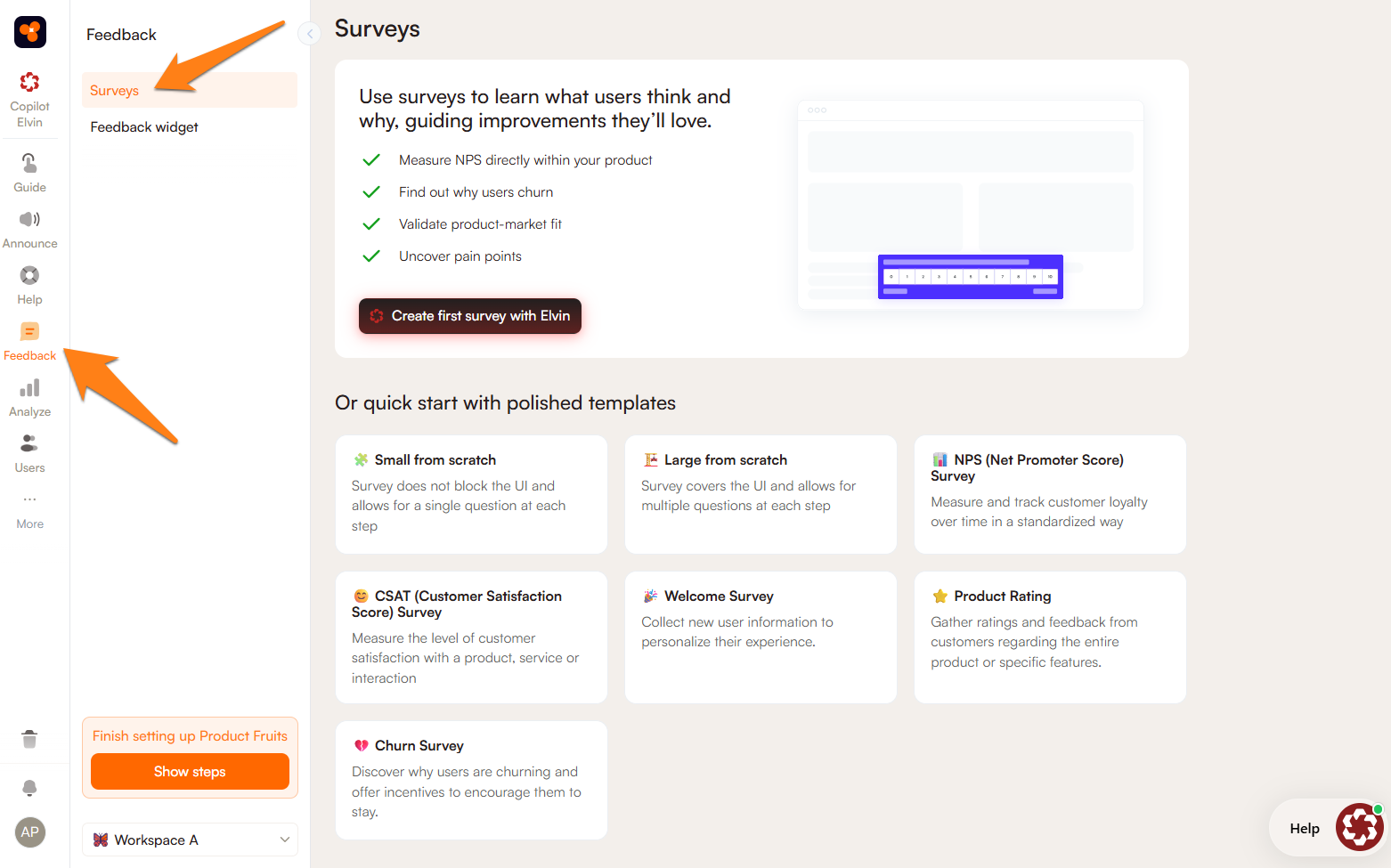
Product Fruits - Product Fruits' AI-powered surveys are built and optimized by Elvin AI: you describe your goal (e.g. "understand why trial users aren't converting"), and Elvin generates a targeted, contextual survey with branching logic and role-based question variants. Surveys fire in-app after key product events, adapt per user segment, and results feed directly into the Product Fruits analytics dashboard.
Delighted (by Qualtrics) - A dedicated NPS and CSAT survey tool with clean in-app and email delivery, strong reporting, and good CRM integrations. Best for teams who want a focused feedback tool and already have onboarding and support covered elsewhere.
Typeform - Flexible survey builder with strong UX for in-product feedback collection. Excellent for qualitative feedback and custom research; lacks the behavioral triggering and in-product context-awareness of purpose-built product adoption tools.
Strategy 4: Reduce Friction with Self-Serve Support
Why self-serve support is a retention lever, not just a cost-saver
The relationship between support experience and churn is direct: users who can't find help when they're stuck become frustrated, lose confidence in the product, and leave. The good news is that most users want to find answers themselves - they just need the right resources in the right place at the right time.
Document360's 2025 self-service research found that 92% of users would use a knowledge base for self-support if one were available to them, and 78% of customers prefer to resolve issues independently before contacting support. Despite this, most SaaS products still route users to external help centers or generic support email - both of which interrupt the user's flow and introduce delay that erodes trust.
Self-serve support done well doesn't just deflect tickets - it actively reduces churn by keeping users in the product, unblocked, and moving toward value. High-performing organizations with mature self-service programs achieve 40–70% support deflection rates, which simultaneously reduces support costs and improves user experience.
Best practice: building a self-serve support layer that actually works
Put support resources inside the product. External help centers require users to leave their workflow, open a new tab, search, and translate generic documentation to their specific situation. In-app help centers eliminate all of that friction by surfacing support resources - guides, tutorials, FAQs, videos - inline, within the interface where the user is already working.
Connect self-serve to your onboarding content. The same tours, checklists, and hints you use for onboarding are also valuable on-demand reference material. A well-structured self-serve system lets users replay a tour, re-open a checklist, or search for a specific feature guide without needing to contact support.
Make support searchable, not just browseable. Users in trouble are not in a browsing mindset. They have a specific question and need an immediate answer. Full-text search across all support resources - articles, tour replays, video walkthroughs - is the single most important usability feature of an in-app help center.
Measure and iterate on support content. Track which articles are searched most, which leave users without a satisfying result, and which are associated with the highest post-view churn. This data tells you exactly where your product has explanation gaps that need addressing - either through better documentation or product UX improvements.
Key KPI targets
- Self-serve deflection rate: 30–40% is a reasonable early target; high performers achieve 60–70% (read how Mystore.no resolves 60 % of support inquiries autonomously with Product Fruits Elvin AI)
- Support ticket volume per active user: should decrease consistently as your self-serve content matures
- Time to resolution: in-app self-serve should resolve most issues in under 2 minutes
Tools for self-serve support
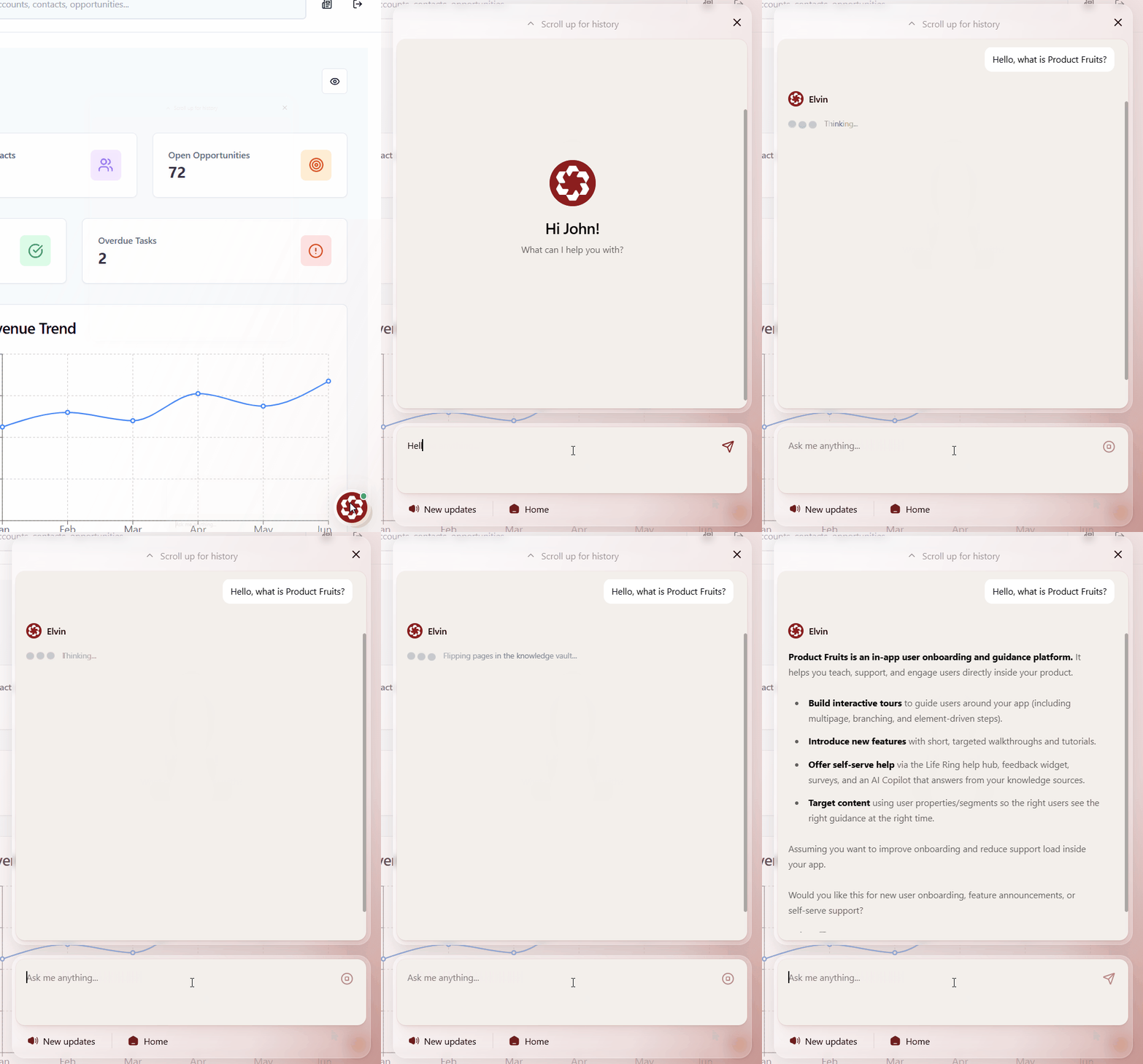
Product Fruits - The in-app help center powered by Elvin AI is in always-visible in-app widget. The integrated knowledge base works as single source of truth for AI (you can connect other sources to it as well), is fully searchable and lives inside the product rather than on a separate domain. And if needed, it will promptly connect uses with human support. Moreover - because it's connected to the same platform as tours, checklists, and hints, users can seamlessly move between guided learning and self-serve reference without leaving the app.
Zendesk - The market-standard customer support platform with a strong knowledge base builder, ticket management, and reporting. Excellent for teams managing high support volumes across multiple channels, though its knowledge base is primarily external rather than embedded in-product.
Document360 - A dedicated knowledge base platform with strong content management, version control, and analytics. Best for teams with large, complex documentation needs; integrates with most support tools but requires a separate in-app widget implementation.
Strategy 5: Deploy AI Assistance to Resolve Friction Instantly
Why AI is now a core retention tool, not a future experiment
In-app AI assistance has moved from early adopter territory to baseline expectation remarkably quickly. The reason is simple: it closes the gap between users having a question and users getting an answer, at scale, without human involvement - and that gap is one of the most reliable predictors of churn.
The data on impact is compelling. Freshworks research on AI in customer service found that B2B SaaS companies using AI-first support platforms achieve 60% higher ticket deflection and 40% faster response times compared to traditional help desk software. A 2025 analysis by Fullview found that AI implementations reduce churn by 10–15% over 18 months - and deliver an average ROI of $3.50 for every $1 invested in AI customer service infrastructure.
The most important thing to understand about AI assistance for churn reduction is where it delivers value: not primarily in cost savings (though those are real), but in the elimination of "stuck moments" - the points in a user's workflow where they have a question that, if unanswered quickly enough, leads to frustration and disengagement.
Best practice: building AI assistance that users actually trust
Use AI to actually guide users, instead of pointing them to support docs. AI assistance that lives in an in-app support center can be aware of where the user is and can provide better answers and guidance. This embeds AI assistance directly within the product interface - available wherever a user is working, not just when they navigate to a support channel.
Ground AI responses in your actual product knowledge. Generic AI assistants answer generic questions. AI that knows your product - your specific features, your terminology, your workflows, your pricing - is dramatically more useful and builds user confidence rather than eroding it. Train or configure your AI assistant against your documentation, onboarding content, and knowledge base.
Make AI a bridge to human support, not a wall. Users who feel trapped in an AI loop and can't reach a human when they need one have a worse experience than if there had been no AI at all. Best-practice AI implementations escalate smoothly to human agents or CS teams when the AI reaches its resolution limit, and they do it without requiring the user to start over.
Measure AI containment rate and post-AI retention. The two metrics that matter most for AI assistance are: (1) what percentage of queries does the AI resolve without escalation (containment rate), and (2) what is the 30-day retention rate for users who interacted with AI support vs. those who didn't? If AI is resolving queries satisfactorily, retention for those cohorts should be measurably higher.
Key KPI targets
- AI containment rate: 50–60% is a reasonable early target; mature implementations achieve 75–85% (Read about Mystore.no 60% autonomous resolution rate for support, or how smaller companies like Adeus can operate 24/7 support with Elvin AI without a single “live” human agent).
- First response time: AI should respond within seconds; this alone significantly improves user satisfaction vs. waiting for email support
- Post-AI-interaction retention: should be equal to or better than post-human-support retention for equivalent query types
Tools for AI-powered in-app assistance
Product Fruits - Elvin AI Copilot is an AI assistant embedded directly in your product. It answers "how do I…" questions in real time, drawing on your knowledge base, onboarding content, and product documentation. Because Elvin operates within the same platform as your tours, hints, checklists, and surveys, and it can actually learn your entire SaaS, it can respond to a user query by creating a relevant individual visual walkthrough - not just a text answer. It's available 24/7 without human involvement and works as an integrated self-serve support layer and adapts to each user - the first truly adaptive onboarding solution. And there are other new exciting features such as conversational guidance, Elvin Vision and more - just watch the short video below.
Intercom Fin - Intercom's AI agent is built on large language models. Strong at handling complex, conversational support queries and handing off to human agents within the Intercom inbox. Best suited to teams already using Intercom for customer communications and live chat.
Freshdesk Freddy AI - Freshworks' AI layer for customer support, with good self-service automation, ticket classification, and suggested responses for agents. Solid option for teams managing support operations at scale who want AI to augment their human CS team rather than replace the first line.
The All-in-One Advantage: Why Combining All Five Strategies in One Platform Matters
Each of the five strategies above delivers measurable impact on its own. But the compounding effect of running all five in an integrated system - where onboarding, adoption, feedback, support, and AI share the same user data, the same behavioral triggers, and the same analytics layer - is significantly greater than the sum of the parts.
Consider what a fully integrated churn prevention loop looks like in practice: a new user goes through a personalized onboarding tour → contextual hints prompt feature discovery as they explore → an NPS survey fires after their first successful workflow and flags early dissatisfaction → the Life Ring button surfaces a relevant guide when they get stuck → Elvin AI answers a specific question in real time → and all of this activity is visible in a single analytics dashboard that shows where your highest-risk cohorts are disengaging.
This is what Product Fruits is built for. It's the only platform that natively integrates all five of these churn-reduction capabilities - tours and checklists for onboarding, hints and announcements for feature adoption, AI-powered NPS and surveys for feedback, a Life Ring button and knowledge base for self-serve support, and Elvin AI Copilot for instant in-app assistance - without requiring you to connect five different tools, maintain five different integrations, and reconcile five different data sources.
That integration matters not just for operational efficiency, but for the user experience itself. Users don't experience your product through the lens of your tool stack - they experience it as one thing. When every layer of your retention system speaks the same language, uses the same user data, and operates in one interface, the experience feels seamless. And seamless experiences are how you keep users.
👉 Start your free version or 14-day trial of Product Fruits - no credit card required. See how all five strategies come together in one platform.
Frequently Asked Questions
Which of the five strategies has the biggest impact on churn first?
For most SaaS teams, fixing onboarding delivers the fastest and largest measurable impact, simply because it addresses the moment of highest churn risk - the first days after sign-up. Activation failures account for a disproportionate share of total churn, and they're often the easiest to diagnose and fix with the right tooling. That said, the strategies compound: teams that fix onboarding first, then layer in adoption and feedback, consistently outperform those focusing on a single area.
How do I measure which strategy is working?
Each strategy has distinct leading indicators: activation rate and time-to-value for onboarding, feature adoption breadth for adoption, NPS trend and Detractor response rate for feedback, ticket deflection rate for self-serve support, and AI containment rate for assistance. The most important lagging indicator across all five is cohort-level 30-day and 90-day retention, tracked by which strategies each cohort experienced.
Do I need separate tools for each of these strategies?
No - this is the case for all-in-one platforms like Product Fruits. However, for specific enterprise use cases (advanced CS health scoring, high-volume multi-channel support operations, or deep product analytics for large data sets), teams often add a dedicated CS platform (Gainsight, ChurnZero) or analytics tool (Mixpanel, Amplitude) alongside their core adoption platform.
How quickly do these strategies reduce churn?
Onboarding improvements show measurable impact in 30–60 days. Feature adoption gains typically take one to two product cycles to compound. Feedback loops deliver value as soon as you act on the signals - the speed of your CS response to Detractors is a key variable. AI assistance shows impact almost immediately, as it removes friction from the first day it's deployed.
The five strategies in this guide are most effective when they work together. Product Fruits is designed specifically for that - giving SaaS product and customer success teams everything they need to onboard, engage, support, and retain users in a single platform.
👉 Start your Product Fruits trial today - it's free, no credit card required.


Weekly newsletter
Get the latest releases, tips, articles, and exclusive interviews delivered to your inbox weekly—no spam!