How to Optimize Your Knowledge Base for AI: What Actually Works


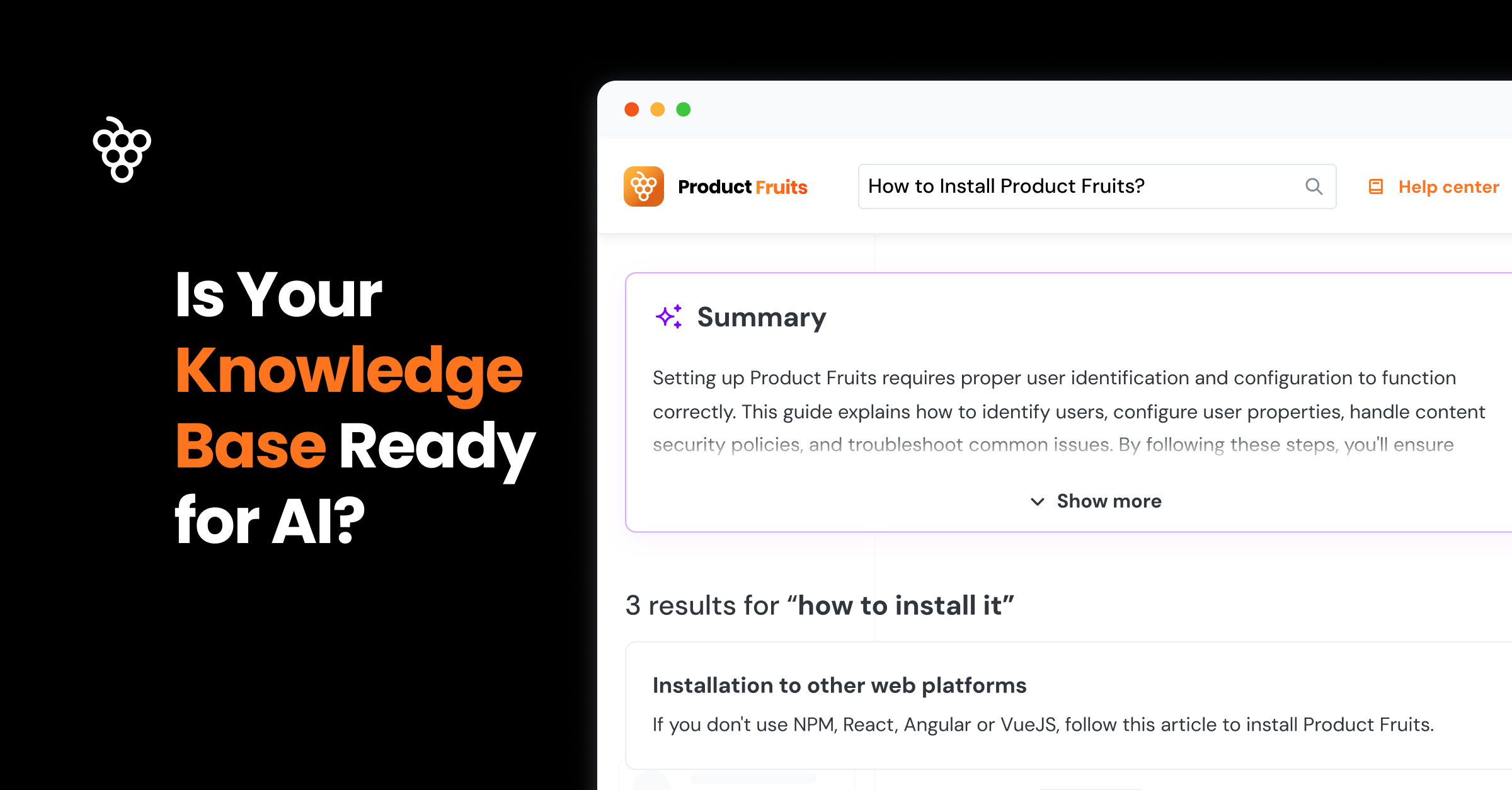
During a recent webinar, we used our own knowledge base as the "bad example."
200+ customers watched us expose how our own knowledge base confused our own AI. Painful? Absolutely. But honestly, it was the best lesson we could give.
The irony wasn't lost on anyone: here we are building AI-powered support tools with a knowledge base designed for the old world of human browsing. Kind of embarrassing, actually.
This put us in an uncomfortable, but valuable spot: fixing our own content structure while helping customers optimize theirs. That dual perspective taught us something important about how AI amplifies existing problems instead of solving them.
TL;DR
AI doesn't fix messy content. It amplifies it. We learned this the hard way when our own knowledge base created confused AI responses. Here's what actually works:
- Focus each article on one specific user problem (not internal feature categories)
- Make every paragraph self-sufficient because AI often uses just one paragraph to answer questions
- Eliminate contradictions because multiple articles saying different things confuses AI
- Use natural language instead of technical jargon
- Assign clear ownership because someone needs to maintain and update content regularly
Bottom line: Well-structured knowledge bases see 60-85% better AI accuracy and 40-60% fewer support tickets. The investment pays off immediately and compounds over time.
The Thing Nobody Sees Coming
Most teams think AI will improve their existing content. They've got it completely backwards.
If your knowledge base is a mess, AI won't clean it up. It'll take that mess and serve it with complete confidence to your users. Think of AI as the world's most confident intern who never admits they don't know something.
We learned this the hard way. Our early AI responses were technically pulling from the right sources but delivering answers that left users more confused than when they started. Picture this: someone asks "How do I reset my password?" and gets a response that starts with billing information because both topics lived in the same scattered article. Not exactly the user experience we were going for.
Once we figured out how AI actually processes content, it all made sense. AI doesn't read your articles like a human browsing through sections. It treats every paragraph as a potential answer to any question. It breaks your content into chunks, creates mathematical (vector) fingerprints of what each chunk means, then matches those fingerprints to user queries.
When your content is organized well, this process feels magical. When your content is scattered all over the place? AI becomes a very confident source of confusion.
The Article That Changed Everything
We had this absolute monster of an article: "Miscellaneous: Passwords, Billing, Account Settings, Marketing Updates, Product Launches." Five completely different topics crammed into one place because someone (our past selves) figured they needed to document all these random account-related things somewhere.
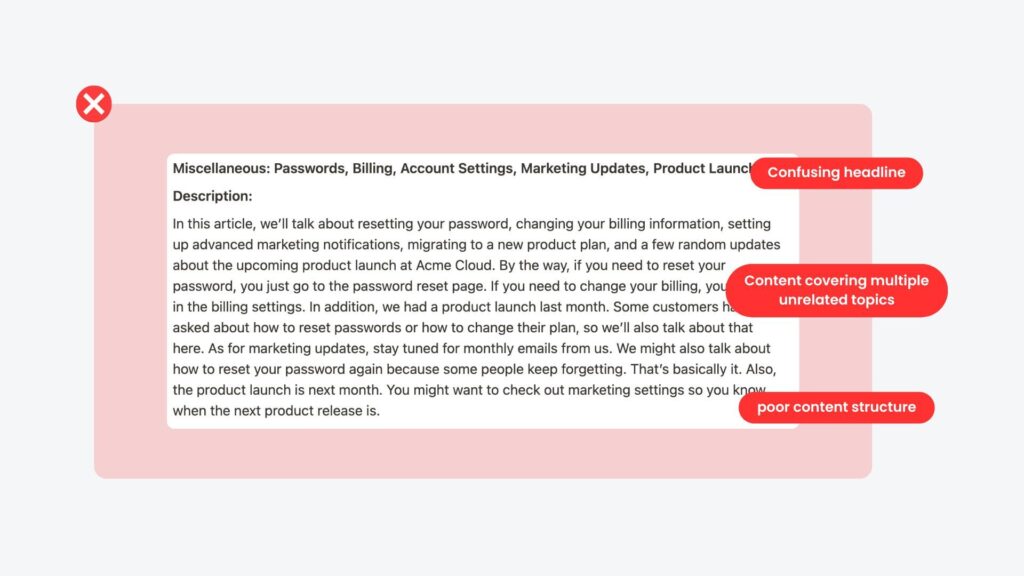
Here's what went wrong: User asks about password resets. AI finds this article because it mentions passwords. But then it also pulls information about billing updates from the same article because they're sitting right next to each other. The result? A response that technically came from our knowledge base, but made absolutely no sense.
This wasn't a technical problem. It was a structural one. Classic case of "garbage in, garbage out," except the garbage was wearing a very convincing AI suit.
The fix seemed obvious once we saw it: split everything into focused articles. "How to Reset Your Password." "How to Update Billing Information." "How to Manage Email Notifications."
Each article became the complete answer to one specific question. The change in AI response quality was immediate and dramatic. Users stopped asking follow-up questions. Support tickets for basic issues dropped.
The real insight: every scattered article creates amplified confusion for AI. Every focused article creates exponential clarity. It's like compound interest, but for not confusing your users.
What We Learned Actually Works
Start with the User's Actual Problem
People don't wake up wanting to learn about "User Management." They wake up needing to remove someone from their team because that person quit yesterday and is now locked out of everything important.
Instead of organizing around our internal feature categories (which made sense to exactly zero users), we organized around the problems people actually have. "How do I remove this person from my team?" beats "User Management Overview" every single time.
We started every article rewrite by asking: "What specific problem is someone trying to solve?" If we couldn't answer that clearly in one sentence, we knew we had work to do. Turns out, we had a lot of work to do.
Make Every Paragraph Self-Sufficient
This was honestly the hardest part. AI often grabs just one paragraph from your article to answer a question. That paragraph needs to work completely on its own.
We found paragraphs like: "Yes, this is supported on Pro plans." Technically accurate. Completely useless without context. The AI equivalent of answering "yes" when someone asks for directions.
Now we write: "Custom integrations are supported on Pro plans and higher. You can set them up by going to Settings > Integrations and clicking 'Add New Integration.'"
Context included. Question restated. Complete answer that makes sense even if it's the only thing someone reads.
Hunt Down Contradictions
Multiple articles saying different things about the same topic turned our AI into a random answer generator. And not in a fun way.
We found articles claiming different timeframes for the same process. Different requirements for the same feature. AI would randomly pick one version, creating inconsistent experiences that eroded user trust pretty quickly.
The fix required making some hard choices. What's the actual timeframe? What are the real requirements? Pick one source of truth per topic and consolidate everything else.
Write Like You're Actually Talking to a Real Person
AI understands natural language way better than any technical jargon. So do humans, for that matter.
We replaced: "Navigate to the user management interface and select the appropriate user entity for modification."
With: "Go to Team Settings and find the person whose permissions you want to change."
The second version is clearer for humans and easier for AI to process. Win-win situation.
Real-World Validation
One team building a digital legacy planning platform approached us early in their development. They were launching with our AI support copilot as a core feature, so their knowledge base needed to be structured for AI from day one.
They built their entire knowledge base around these principles from the start. The result: their AI copilot handles 60% of queries end-to-end with less than 10% error rate. Users complete sensitive processes like digital will creation without human guidance.
Legal and financial planning involves nuanced decisions where accuracy matters enormously. Yet the AI performs reliably because the underlying content structure supports it. To see it in action, read the case study.
The Technical Side That Absolutely Matters
Structure That AI Can Navigate
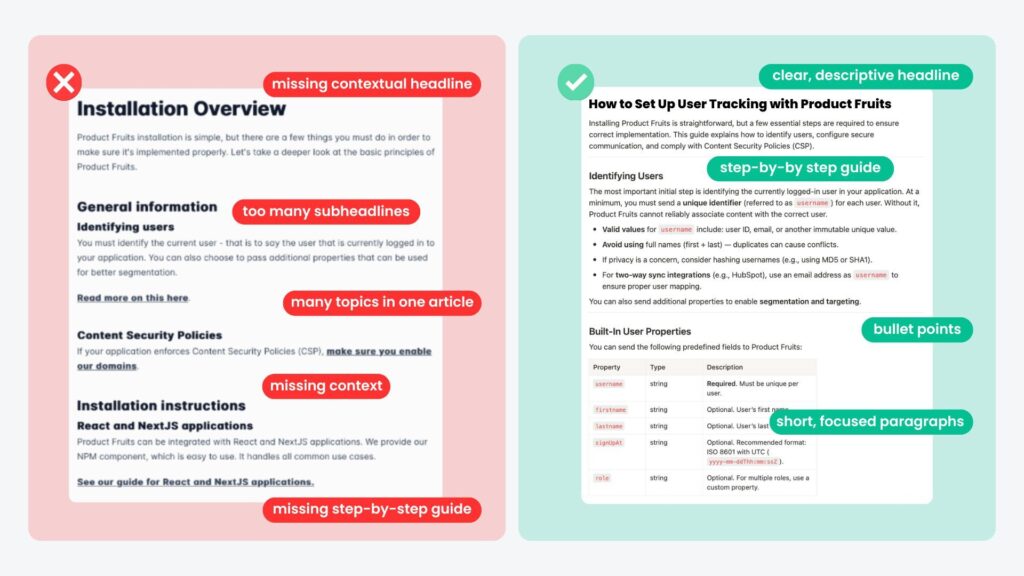
Descriptive headings work like road signs for AI. "Updating Your Payment Method" tells AI exactly what this section covers. "Step 3" tells it absolutely nothing useful.
Short, focused paragraphs create clean information chunks. AI processes content in digestible pieces, and cleaner pieces produce better responses.
FAQ sections are absolute AI gold. They provide perfect question-and-answer templates. Add 3-5 common questions to every major article.
Plain text beats fancy formatting every single time. AI reads text reliably, but struggles with complex tables, images and videos.
Content Rules to Prevent Chaos
Stick to consistent terminology. If you call something a "workspace" in one article, don't call it a "project" in another. AI treats different terms as completely different concepts.
Include natural search variations. People search for "log in," "login," and "sign in." Include common variations naturally in your content.
Delete outdated information completely. AI can't distinguish between current and deprecated instructions. Clean house regularly.
Explain concepts when you mention them. Don't assume context from other articles. When you mention a feature, briefly explain what it does.
Where to Start (Without Overwhelming Your Team)
Don't try to fix everything at once. That's a recipe for burnout and half-finished improvements.
Start with pain points you can actually measure:
- Your most-searched topics with the lowest satisfaction scores
- Questions where AI repeatedly gives unhelpful answers
- Articles that generate follow-up support tickets
- Topics your support team flags as commonly confusing
These represent your highest-impact opportunities. Fix these first, then expand from there.
But here's the crucial part: assign clear ownership. Designate one person or small team to own your knowledge base and keep it current. Without dedicated ownership, even perfectly structured articles become outdated over time.
A Four-Step Plan to Fix Your Knowledge Base
Step 1: Identify your top 10 problem articles using search data, satisfaction scores, and support team input.
Step 2: Split multi-topic articles into focused pieces. Give each article one clear, specific purpose.
Step 3: Rewrite for clarity and completeness. Add FAQ sections to each of the articles. Remove jargon.
Step 4: Set up measurement systems. User feedback on AI responses. Performance tracking. Regular review schedules.
This approach produces visible improvements quickly while building the foundation for continuous optimization.
Why This Investment Pays Off
Teams that restructure their knowledge bases properly see immediate improvements:
- 60-85% better AI response accuracy
- 40-60% fewer basic support tickets
- Faster user onboarding and problem resolution
- Higher customer satisfaction across all interactions
But the real advantage compounds over time. Every well-structured article works indefinitely. Traditional support scales linearly with team size. Optimized knowledge bases scale exponentially with usage.
The ROI is compelling: customers solve more problems themselves, support teams focus on complex issues, and everyone's experience improves.
The Strategic Reality
Your knowledge base is becoming the foundation of every AI interaction in your product. Companies investing in proper information architecture now will deliver dramatically better AI experiences than those trying to patch problems later. The question isn't whether AI will become standard in customer support. It's whether your knowledge base will be ready when it does.
Are you ready to transform your knowledge base?


Weekly newsletter
Get the latest releases, tips, articles, and exclusive interviews delivered to your inbox weekly—no spam!