How DAP - Digital Adoption Platform Benefits Business


In today’s fast-paced digital landscape, simply deploying new software isn’t enough - your users must actually adopt and effectively leverage it. That’s where a Digital Adoption Platform (DAP) steps in: an intelligent layer overlaying your applications to provide in-app, contextual guidance that helps users engage confidently, efficiently, and autonomously. Let's look at how DAP benefits business in more detail.
TL;DR - How DAPs Benefit Business
A Digital Adoption Platform (DAP) overlays apps and portals with in-app guidance, self-help, and analytics to boost adoption, cut churn, and maximize ROI.
Key benefits:
- Faster onboarding & training - users learn while working, reducing time-to-value.
- Higher adoption & satisfaction - contextual tips and tours reduce confusion and frustration.
- Lower churn - even a 1–2% monthly drop can greatly improve SaaS revenue.
- Scalable enablement - reusable guides across roles, geographies, and tools.
- Data-driven improvement - analytics reveal friction points to fix.
Where used:
- SaaS (CRM, ERP, HR), web/customer portals, and intranets.
- Works as universal overlays (e.g., WalkMe, Product Fruits, Whatfix) or app-specific (e.g., VisualSP for M365/Sharepoint/Dynamics, uPerform for SAP, Spekit for Salesforce).
Bottom line: DAPs turn software deployment into real user adoption, productivity, and business impact.
What are DAPs - Digital Adoption Platforms
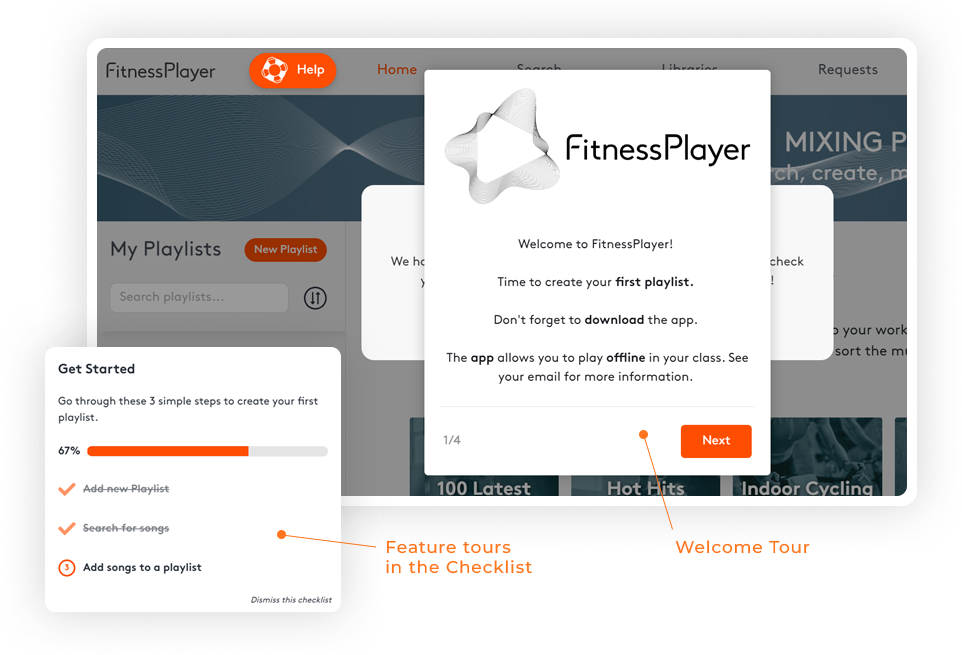
DAPs deliver onboarding checklists, hints, walkthroughs, tooltips, self‑help menus, and behavioral analytics. They bridge the gap between installation and real ROI from a SaaS vendor perspective and between hiring and full productivity from an employer perspective. DAPs are guiding users to the so-called "aha moment" when they realize the actual key or core value of a SaaS, web, or intranet portal.
By embedding guidance at the point of need, DAPs reduce friction, accelerate onboarding, and uncover insights to optimize workflows. As McKinsey highlights, 70% of digital transformation initiatives fail largely due to poor user adoption - yet DAPs are purpose-built to reverse this trend.
An important capability provided by DAPs is segmentation, for both SaaS users and employees. As Wikipedia notes "Different employees of an organization may have different levels of experience in using enterprise software. The DAP, therefore, needs to deliver targeted and segmented guidance to ensure that the user experience does not get impacted by excessive or inadequate guidance information."
DAPs are also perfect tool for reduction of user churn in SaaS. Churn shows percentage of users who stoped using a product typically because they got stuck and/or did not realize its real benefit or value.
A typical SaaS saas monthly churn is between 3% -5%, this results in 30% - 60% annual churn. In other words about half of all customers have to be replaced with new ones just to maintain steady base. Using DAP to reduce monthly churn by one or two percentage points has therefore great impact on bottom line overall.

Seven Core Business Benefits of a Digital Adoption Platform
1. Faster User or Employee Onboarding into Applications, Ongoing Training
DAPs streamline the onboarding process for SaaS and web applications or portals, providing interactive, in-app guidance that enables users to learn while they work. New users are guided through relevant features at exactly the right time, boosting proficiency without interrupting workflows.
2. Increased User Adoption and Proficiency
By guiding users or employees contextually - from role‑based onboarding to behavior-sensitive tips - DAPs help them reach that “aha” moment faster and master software more fully.
Visuals and overlays reduce complexity and confusion, improving feature usage and minimizing abandonment. In fact, leading DAPs have helped organizations reduce user task times by up to 70% and increase productivity up to threefold
3. Enhanced User Satisfaction
Smooth, supportive interactions foster confidence and satisfaction. According to multiple sources, DAPs deliver improved user experience and ideally make using new software a breeze, resulting in happier and more confident users.
When users or employees experience fewer roadblocks—digging into in-app help instead of pausing to seek external assistance—the result is less frustration, higher engagement, and more positive impressions.
5. Scalable Learning and Support Platform
A centralized DAP enables consistent, scalable delivery of training materials and guides across personas and geographies. No need for repeated content creation - the same interactive walkthrough can be reused, adapted, and instantly updated across your user base or for employees across many branches - even in multiple countries.
6. Analytics and Feedback Loops for Optimization
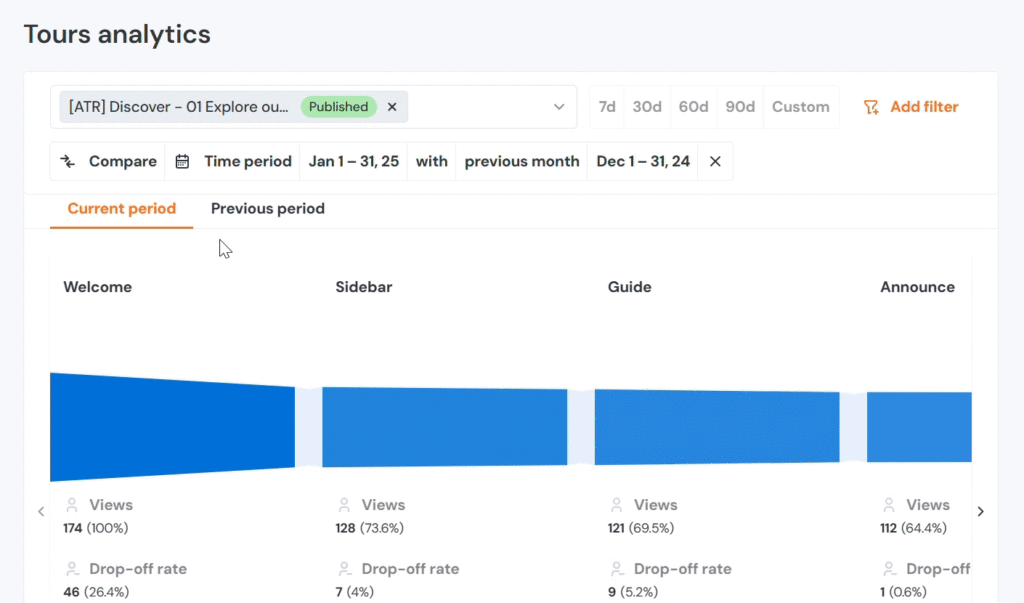
Integrated analytics let organizations track user behavior, identify friction points, and refine guidance strategies rapidly. Monitoring feature usage and engagement helps pinpoint areas needing support and improving workflows iteratively
7. A Central Hub for Support and Training
DAPs serve as a focal point for training and user support - aggregating tooltips, walkthroughs, and self-help into a unified, accessible environment, reducing dependency on scattered manuals or disparate resources
Business Benefits of DAP Across Different SaaS Types and Platforms
Digital Adoption Platforms of course vary in their functionalities and capabilities.
Software-agnostic DAPs
These are designed to work as an overlay with virtually any SaaS, intranet or web portal. Examples of these are:
- WalkMe - historically first enterprise DAP that “overlays on any application,” with guidance, automation and analytics.
- Product Fruits - Universal all-in-one no-code onboarding platform with AI-assisted product tours, surveys, and AI support copilot that handles over 50% of requests autonomously.
- Whatfix - app-agnostic guidance across internal and customer-facing apps (web/desktop/mobile)
Platform-focused DAPs
Other DAPs may be focused on specific software platforms such as those from the Microsoft ecosystem, SAP, Oracle, Workday, Salesforce or HubSpot, etc. Examples would be:
- VisualSP (Microsoft 365/SharePoint/Dynamics) - in-context training and micro-learning embedded in M365/SharePoint (and Dynamics)
- uPerform (SAP / Epic / Oracle) - “just-in-time” training and simulations tightly integrated with major enterprise apps.
- Spekit (Salesforce-led) - sales-enablement flavored DAP with one-click Salesforce integration and in-app training.
SaaS Applications by Function
Different types of SaaS, such as CRM, ERP, HCM, and industry apps - have unique complexity and adoption challenges. DAPs tailor guidance by application and user context:
- CRM & Sales Tools (e.g., Salesforce, HubSpot): DAPs help enforce data hygiene with in-app nudges, guide opportunity tracking, and standardize customer service workflows
- ERP Systems: With modules spanning finance, supply, and production, ERP adoption suffers from user confusion. DAP overlays offer navigation help, report generation guidance, and form validation support
- HCM & HR Tools: DAPs ensure employees complete HR workflows accurately - from leave requests to benefits setup - with guided checklists and contextual validation.
These use cases highlight how DAPs lift SaaS adoption by simplifying complex processes and reducing gatekeeping for users.
Industry-Specific SaaS
- Tech/Enterprise: LinkedIn implemented a DAP for its HRM system, reducing live training, enhancing productivity, and lowering frustration Digital Adoption.
- Insurance: Direct Insurance saved 30 hours of training monthly, reduced support tickets and increased employee productivity in their core system with Product Fruits DAP
- Healthcare: Christus Health deployed a DAP across 20 applications, enabling on-the-job learning and reducing support calls across their workforce of over 45,000 professionals as also quoted by Digital Adoption.
Web Portals & Customer-Facing Interfaces
For employee or customer portals - like patient portals, supplier dashboards, or self-service tools - DAPs enhance user onboarding and task completion by:
- Guiding first-time visitors toward registration, form completion, or payments.
- Highlighting important features or announcements contextually.
- Reducing drop-off and abandonment by providing on-demand assistance.
By simplifying the experience, DAPs drive higher conversions and repeat usage.
Intranet and Internal Use Cases
Internal systems - such as corporate intranets, policy repositories, or knowledge hubs - often go underutilized due to poor navigation or lack of awareness. Here’s how DAPs add value:
- Intranet Onboarding: Employees find key resources, tools, or pages faster via interactive walkthroughs.
- Policy & Compliance Awareness: DAP can deliver pop-ups or guided tours explaining new policies, ensuring all employees follow updated procedures.
- Adoption of Internal Tools: When introducing new systems for performance reviews, procurement, or communications, DAP ensures employees adopt them efficiently, reducing manual training load.
- Hybrid/Remote Workforce Support: As Deloitte notes, many workers now operate in alternate work arrangements. DAPs provide just-in-time assistance directly in applications, vital in remote or intermittent usage contexts Deloitte Italia
Summary of How DAP Helps Across Business Scenarios
ScenarioDAP BenefitEmployee OnboardingInteractive walkthroughs and tooltips speed onboarding across appsSaaS Adoption (CRM, ERP, HCM)Contextual guidance improves data accuracy, workflow coherence, feature useWeb & Customer PortalsGuides new users, improves task completion, reduces abandonmentIntranet / Internal ToolsDrives usage, supports compliance, assists remote workSupport & TrainingReduces helpdesk tickets and training costsAnalytics-Driven ImprovementTracks behavior, optimizes processes, feeds continuous improvement
Final Thoughts
Digital Adoption Platforms have proven to be powerful enablers of digital success. By delivering contextual, in-app guidance, they empower users across SaaS tools, web portals, and internal systems to navigate confidently and efficiently - driving stronger adoption, reducing costs, and unlocking full ROI. When organizations align DAP deployments with strategic goals across onboarding, customer interactions, remote work, and compliance, the result is a more responsive, productive, and digitally literate workforce.


Weekly newsletter
Get the latest releases, tips, articles, and exclusive interviews delivered to your inbox weekly—no spam!